

Streaming#
nominal-streaming sends data points to a Nominal dataset as your program produces them. It batches points in memory, applies backpressure when the network can’t keep up, and can write to a file when requests fail. Use it from Rust, or from Python through the nominal-streaming package.
This quickstart creates a dataset, streams 10 seconds of engine values to it, and opens the result in Nominal.
1. Install#
Use cargo to generate a new Rust project which uses nominal to create a dataset and nominal-streaming to stream your data to that dataset. The async calls in nominal require a tokio runtime.
cargo new streaming-quickstart
cd streaming-quickstart
cargo add nominal-streaming nominal
cargo add tokio --features full
With Python 3.11 or later, install nominal to create a dataset and nominal-streaming to stream your data to that dataset:
pip install nominal-streaming nominal
2. Set up your API key#
Follow API Keys Setup to generate a profile for your default workspace and then create a second profile, sandbox, for your sandbox workspace. The code below is written against sandbox, but it can be changed to use any profile.
3. Stream values#
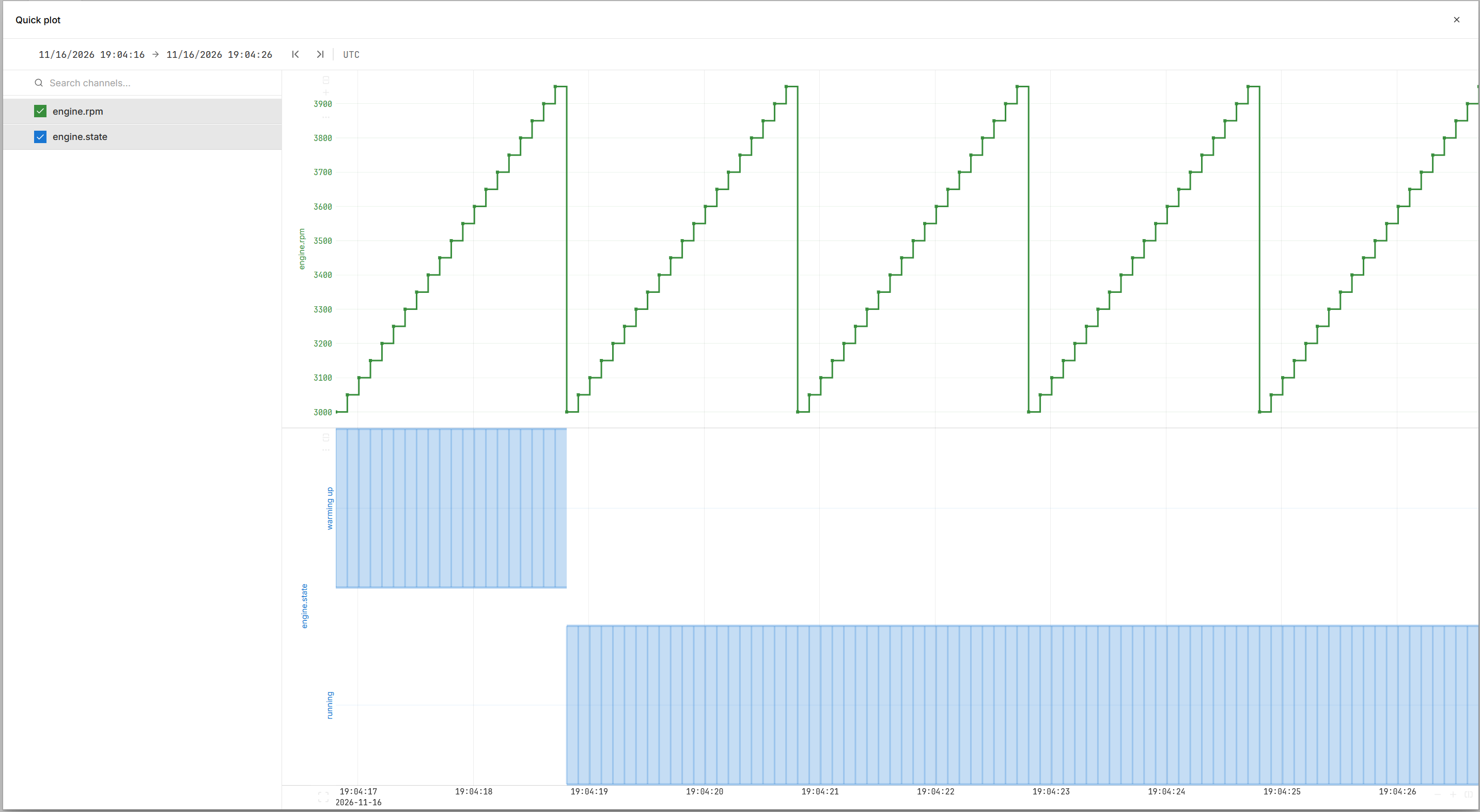
This quickstart creates a new dataset and streams 10 seconds of data on two channels (engine.rpm and engine.state) to it.
Replace src/main.rs with:
use std::time::{Duration, UNIX_EPOCH};

use nominal::core::DatasetCreate;
use nominal_streaming::prelude::*;
use nominal_streaming::stream::NominalDatasetStreamBuilder;

#[tokio::main]
async fn main() -> Result<(), Box<dyn std::error::Error>> {
    // Load the API key and base URL that API Keys Setup saved
    let config = nominal::Config::load()?;
    let profile = config.get_profile("sandbox").ok_or("no profile named sandbox")?;

    // Create the dataset to stream to
    let client = nominal::NominalClient::from_profile_config(profile)?;
    let created = client.catalog().create_dataset(DatasetCreate::new("Streaming quickstart")).await?;

    // Stream to the new dataset, saving points that can't be sent to a fallback file
    let token = BearerToken::new(profile.token())?;
    let dataset = ResourceIdentifier::new(created.rid())?;
    let stream = NominalDatasetStreamBuilder::new()
        .stream_to_core(token, dataset, tokio::runtime::Handle::current())
        .with_options(NominalStreamOpts::default().with_base_api_url(profile.base_url()))
        .with_file_fallback("fallback.avro")
        .try_build()?;

    // A writer for each channel, then 10 seconds of points on each, 100 ms apart
    let mut rpm = stream.double_writer(ChannelDescriptor::new("engine.rpm"));
    let mut state = stream.string_writer(ChannelDescriptor::new("engine.state"));
    let mut timestamp = UNIX_EPOCH.elapsed()?;
    for i in 0..100 {
        rpm.push(timestamp, 3000.0 + 50.0 * (i % 20) as f64);
        state.push(timestamp, if i < 20 { "warming up" } else { "running" });
        timestamp += Duration::from_millis(100);
    }

    // Writers pass their last points to the stream when dropped; dropping the stream
    // then waits until every point has been sent or saved to the fallback file
    drop(rpm);
    drop(state);
    drop(stream);

    // Print the link to the dataset in Nominal
    println!("{}", created.nominal_url());
    Ok(())
}
Run it with cargo run.
Save this as quickstart.py:
import time
from pathlib import Path

from nominal.config import NominalConfig
from nominal.core import NominalClient
from nominal_streaming import NominalDatasetStream, PyNominalStreamOpts

# Load the API key and base URL that API Keys Setup saved
profile = NominalConfig.from_yaml().get_profile("sandbox")

# Create the dataset to stream to
client = NominalClient.from_token(profile.token, profile.base_url, workspace_rid=profile.workspace_rid)
dataset = client.create_dataset("Streaming quickstart")

# Stream to the new dataset, saving points that can't be sent to a fallback file
stream = (
    NominalDatasetStream(auth_header=profile.token, opts=PyNominalStreamOpts(base_api_url=profile.base_url))
    .with_core_consumer(dataset.rid)
    .with_file_fallback(Path("fallback.avro"))
)

# Leaving the block sends what's buffered and closes the stream
with stream:
    # 10 seconds of points on each channel, 100 ms apart
    timestamp = time.time_ns()
    for i in range(100):
        stream.enqueue("engine.rpm", timestamp, 3000.0 + 50.0 * (i % 20))
        stream.enqueue("engine.state", timestamp, "warming up" if i < 20 else "running")
        timestamp += 100_000_000

# Print the link to the dataset in Nominal
print(dataset.nominal_url)
Run it with python quickstart.py.
4. See the data#
Open the printed link to view your dataset. You can then click QUICK PLOT to view the data.
5. Confirm no data was dropped#
In environments where network connectivity is weak, the code will attempt to avoid losing data by writing to a fallback file.
In Rust, this is enabled by adding .with_file_fallback("fallback.avro") to the StreamBuilder.
    let stream = NominalDatasetStreamBuilder::new()
        .stream_to_core(token, dataset, tokio::runtime::Handle::current())
        .with_options(NominalStreamOpts::default().with_base_api_url(profile.base_url()))
        .with_file_fallback("fallback.avro")
        .try_build()?;
In Python, this is enabled by adding .with_file_fallback(Path("fallback.avro")) to the Stream constructor call.
stream = (
    NominalDatasetStream(auth_header=profile.token, opts=PyNominalStreamOpts(base_api_url=profile.base_url))
    .with_core_consumer(dataset.rid)
    .with_file_fallback(Path("fallback.avro"))
)
Under the hood, the code automatically adds a time suffix to the filename. That is, fallback.avro automatically becomes something like fallback_20260101_120000.avro.
This file is only created if requests fail. If no file exists, your stream was successful. If you do see this file, you will want to upload it to the same dataset with nomctl or a Nominal client when connectivity is back. See Upload a file to Nominal.
Next#
Write each value type and tags, set batching and backpressure, handle errors, keep files of what you stream, and stream logs.
The Rust crate and the Python package.