# Combining the default and tagged approaches
This approach is for [units under test](https://dev.nominal.io/platform/reference/glossary.md#unit-under-test-uut "The device or system being tested, also called a device under test (DUT).") that have data of their own and also share a data source that runs across many tests.
For example, during flight tests each vehicle’s recorder logs its own data, while a ground station runs all day as several vehicles fly. Each vehicle keeps its own [asset](https://dev.nominal.io/platform/reference/glossary.md#asset "A physical or simulated device or system you track in Nominal, such as a vehicle, a component, a unit under test, or a test stand.") and [dataset](https://dev.nominal.io/platform/reference/glossary.md#dataset "A store in Nominal for time-series and log data, which grows as you upload or stream more into it."), as in the [default approach](https://dev.nominal.io/platform/data-model/organization/per-asset.md). The ground station writes to one dataset and [tags](https://dev.nominal.io/platform/reference/glossary.md#tag "A key-value pair on your data points, such as motor_id: 1, that lets you filter a subset of points from a single dataset.") each point with the vehicle it’s testing, as in the [tagged approach](https://dev.nominal.io/platform/data-model/organization/tagged-data.md), so its software only needs the ID of the vehicle under test, not each vehicle’s dataset. Its history also stays in one place, for [monitoring the ground station itself](https://dev.nominal.io/platform/data-model/organization/combined.md#monitoring-the-shared-source).
## Implementing this approach
Each unit’s asset links its own dataset under the [ref name](https://dev.nominal.io/platform/reference/glossary.md#ref-name "The name an asset or run gives each data source attached to it, such as default. Workbooks and checklists find channels by ref name and channel name.") `default`, and the shared dataset under a ref name for the source, such as `station`, filtered to that unit’s tag. Use the same ref names on every unit, so one [workbook](https://dev.nominal.io/platform/reference/glossary.md#workbook "Where you analyze time-series data from assets and runs, in tabs and panels, after a test or live.") or [template](https://dev.nominal.io/platform/reference/glossary.md#template "A workbook saved without a run or asset, so the same analysis can be applied to each new run or asset.") works on all of them.
```mermaid
---
config:
layout: elk
---
flowchart BT
classDef green fill:#dcfce7,stroke:#15803d,color:#1f2937
classDef purple fill:#e0e7ff,stroke:#4338ca,color:#1f2937
classDef darkgreen fill:#bbf7d0,stroke:#15803d,color:#1f2937
uut1data[("Dataset
UUT1")]:::purple
uut1["Asset: UUT1"]:::green
uut1data -->|"ref name=default"| uut1
uut2data[("Dataset
UUT2")]:::purple
uut2["Asset: UUT2"]:::green
uut2data -->|"ref name=default"| uut2
subgraph stationData["Dataset: Station"]
s1["UUT=UUT1
09:00:00 · 12.1
..."]:::purple
s2["UUT=UUT2
13:30:00 · 11.8
..."]:::purple
end
style stationData fill:#f5f7ff,stroke:#4338ca,color:#1f2937
stationData -->|"ref name=station
filter UUT=UUT1"| uut1
stationData -->|"ref name=station
filter UUT=UUT2"| uut2
station["Asset: Station"]:::darkgreen
stationData -->|"ref name=default
no filter"| station
click uut1,uut2,station href "../../#asset" "Asset"
click uut1data,uut2data,stationData,s1,s2 href "../../#time-series-data" "Time-series data"
```
The tag filter is part of the asset’s link to the shared dataset, so each unit’s asset sees only its own part of the station’s data, and its own dataset is never filtered. A workbook on a unit’s asset shows both, with no tag filter in the workbook.
### In the app
Give each unit an asset with a dataset of its own:
1. In the sidebar, click **Assets**, then **NEW ASSET**.
2. Give the asset a title, and add **Labels** and [properties](https://dev.nominal.io/platform/reference/glossary.md#property "A key-value pair, of type Text or Number, that describes an asset, run, or data source, such as an identifier, context, or a quantity.") (**Add property**) that describe the unit.
3. Under **Data sources**, click **ADD DATA SOURCE**, then **New dataset**, or pick an existing dataset.
4. Under **Refname**, type `default`, the same on every unit, and click **Create “default”**.
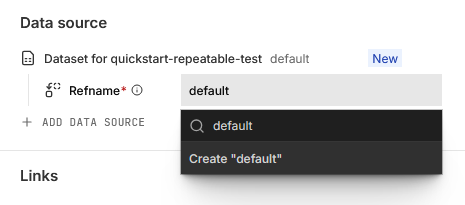
5. Click **CREATE ASSET** and then **View asset** in the notification.
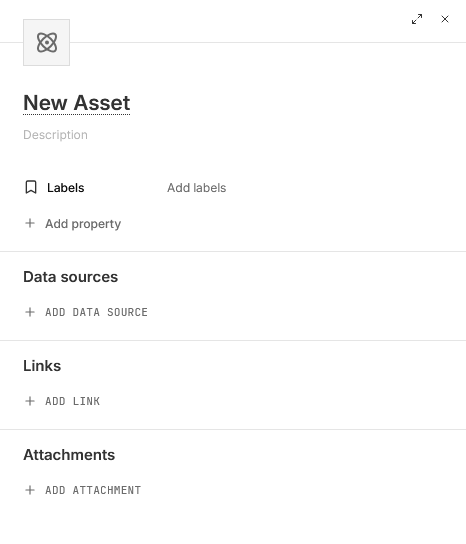
Then attach the shared dataset to each unit’s asset under a ref name such as `station`, filtered to that unit’s tag:
1. Open the asset. If its properties panel is hidden, open it with the panel icon at the top right, beside **NEW WORKBOOK**. Find the **Data source** section.
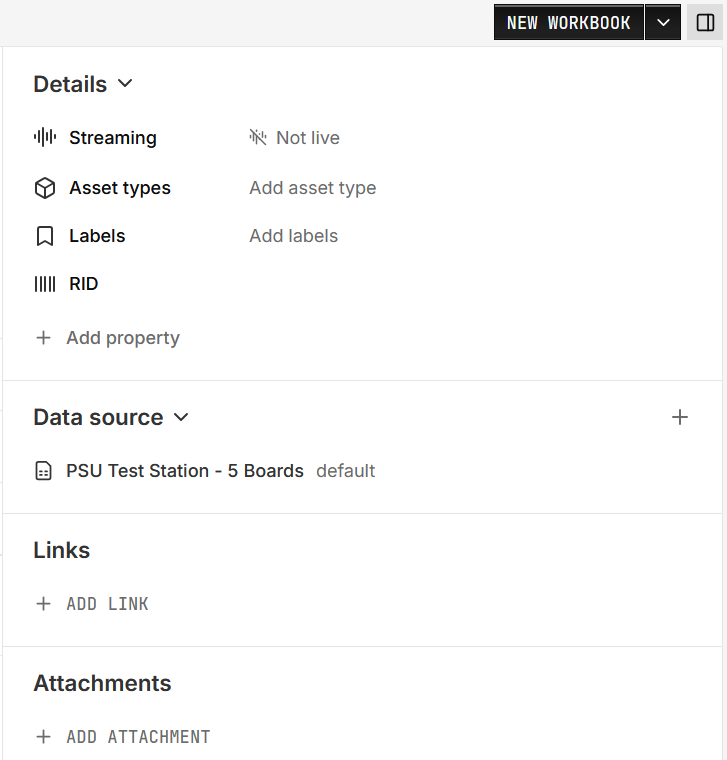
2. Click **+** (**Add data source**) and pick the dataset. If the asset has no data sources yet, click **ADD DATA SOURCE** instead.
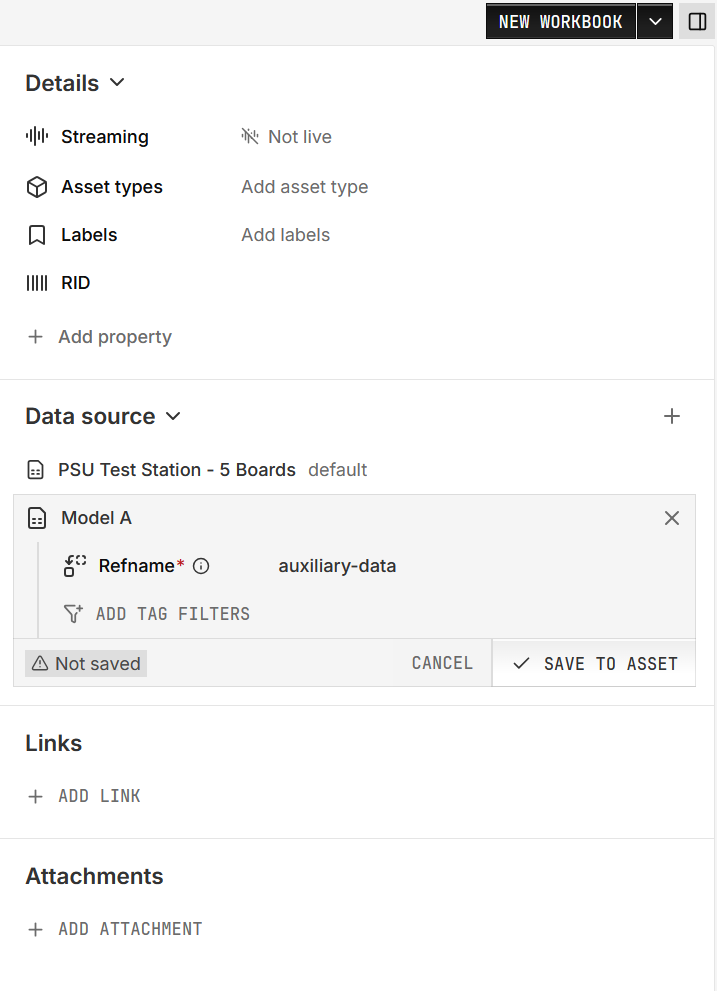
3. Under **Refname**, choose or create a [ref name](https://dev.nominal.io/platform/reference/glossary.md#ref-name "The name an asset or run gives each data source attached to it, such as default. Workbooks and checklists find channels by ref name and channel name.").
4. To attach only part of a shared dataset, click **ADD TAG FILTERS**, choose the tag key, then click its value and pick the value.
5. Click **SAVE TO ASSET**.
### In code
In Python, give each unit its own dataset and a filtered link to the station’s dataset, then write to both:
```python
from nominal.core import NominalClient
client = NominalClient.from_profile("default")
station = client.get_dataset("") # the station's dataset
unit_datasets = {}
for uut in ["UUT1", "UUT2"]:
asset = client.create_asset(uut)
unit_datasets[uut] = asset.get_or_create_dataset("default", name=uut) # the unit's own data
asset.add_dataset("station", station, series_tags={"UUT": uut}) # tag filter: only this unit's points
# The tag decides which unit sees the point: this one appears on UUT1 only
with station.get_write_stream() as stream:
stream.enqueue("voltage", "2026-01-01T12:00:00Z", 12.1, tags={"UUT": "UUT1"})
# A unit's own dataset needs no tags: every point in it belongs to UUT1
with unit_datasets["UUT1"].get_write_stream() as stream:
stream.enqueue("temperature", "2026-01-01T12:00:00Z", 41.5)
```
In Rust, MATLAB, and Go, the [tagged approach’s code](https://dev.nominal.io/platform/data-model/organization/tagged-data.md#tagged-data-code) sets up the same filtered link. Use a ref name for the source, such as `station`, in place of `default`.
## Extensions
### Monitoring the shared source
Give the shared source an asset of its own, with its dataset attached under `default` and no filter, as with the “Station” asset in the [diagram above](https://dev.nominal.io/platform/data-model/organization/combined.md#implementing-this-approach). A workbook on that asset shows every point the shared source recorded, regardless of unit, as in the tagged approach’s [production tester monitoring](https://dev.nominal.io/platform/data-model/organization/tagged-data.md#production-tester-monitoring).
### When the shared source can’t tag by unit
If the shared source doesn’t record which unit it’s testing but writes files, add the tag when you upload each file. In the upload’s **Settings** panel, under **Tags**, click **ADD TAG** and enter the unit, such as `UUT` = `UUT1`. In code, [pass the tags with the upload](https://dev.nominal.io/quickstart/quick/quick-tags.md).
If the data can’t be tagged at all, attach the shared dataset with no filter to the asset for each unit, and record each test as a [run](https://dev.nominal.io/platform/reference/glossary.md#run "A named, time-bounded period of interest on one or more assets, such as a test, a flight, or a race session.") on that asset. A workbook on the run then shows only what the shared source recorded during that test. Outside those runs, the asset also shows what the source recorded while testing other units.