# Simulation before hardware
Story: “I don’t have hardware. I’m building software, test procedures, and simulations, and I may need those results to line up with real tests later.”
This page is for simulation and software engineers who work ahead of hardware, writing models, simulations, and test cases before physical testing starts.
## How to organize your data
To organize test data, start with the [simulations approach](https://dev.nominal.io/platform/data-model/organization/simulation.md). In this approach there is a single [dataset](https://dev.nominal.io/platform/reference/glossary.md#dataset "A store in Nominal for time-series and log data, which grows as you upload or stream more into it.") for each model, and data from each execution is [tagged](https://dev.nominal.io/platform/reference/glossary.md#tag "A key-value pair on your data points, such as motor_id: 1, that lets you filter a subset of points from a single dataset.") according to what best identifies the data (such as a parameter or an execution ID).
Simulation executions are stored as [runs](https://dev.nominal.io/platform/reference/glossary.md#run "A named, time-bounded period of interest on one or more assets, such as a test, a flight, or a race session."). [Upload](https://dev.nominal.io/platform/reference/glossary.md#upload "To send a finished file to Nominal, from the app or a client library, so it can be ingested into a dataset.") or [stream](https://dev.nominal.io/platform/reference/glossary.md#stream "To send points to Nominal as they're produced, instead of uploading a finished file.") every execution with the same fixed “zero” timestamp, such as the Unix epoch (1970) or a fixed recent t0, so the executions overlay on top of each other with no shifting.
Executions *can* keep their real timestamps if desired. In this case, separate time ranges allow you to view each run on a single linear timeline, but to compare them, each run has to be shifted in time.
```mermaid
---
config:
layout: elk
---
flowchart BT
classDef red fill:#fee2e2,stroke:#b91c1c,color:#1f2937
classDef purple fill:#e0e7ff,stroke:#4338ca,color:#1f2937
subgraph dataset1["Dataset: Model A"]
row1["model=A
execution-id=1
0.0 s · 100.0
0.1 s · 101.3
..."]:::purple
row2["model=A
execution-id=2
0.0 s · 100.0
0.1 s · 98.7
..."]:::purple
end
style dataset1 fill:#f5f7ff,stroke:#4338ca,color:#1f2937
run1["Run A1
Filters:
Model A
execution 1"]:::red
row1 --> run1
run2["Run A2
Filters:
Model A
execution 2"]:::red
row2 --> run2
click row1,row2 href "../../../#time-series-data" "Time-series data"
click run1,run2 href "../../../#runs" "Runs"
```
> **Note**
>
> If a model is executed thousands of times, such as in a Monte Carlo analysis, it may be challenging to create and use thousands of individual runs. You can instead make a single run which includes all of the data and split it by tag in a [workbook](https://dev.nominal.io/platform/reference/glossary.md#workbook "Where you analyze time-series data from assets and runs, in tabs and panels, after a test or live."). The benefit is you only deal with a single run, but the drawback is that some types of analysis may be harder to perform. For example, Nominal [comparison workbooks](https://dev.nominal.io/platform/reference/glossary.md#comparison-workbook "A workbook that compares aggregated metrics, such as each run's mean or maximum, across many runs or assets.") are built to compare many runs, not data split by tag. See [Large campaigns](https://dev.nominal.io/platform/data-model/organization/simulation.md#large-campaigns) for details on this approach.
If your work is pure simulation, this is all you need. If you expect to have hardware eventually and plan to compare live hardware data against the simulation, you should ensure that each [channel’s](https://dev.nominal.io/platform/reference/glossary.md#channel "A named signal: a series of measurements or computed values, such as voltage, pressure, or system state.") unique identification is the same. In Nominal, a channel is uniquely identified by its [ref name](https://dev.nominal.io/platform/reference/glossary.md#ref-name "The name an asset or run gives each data source attached to it, such as default. Workbooks and checklists find channels by ref name and channel name.") and channel name together, written like `default.voltage`. If you follow the walkthrough below and use `default`, make sure the hardware teams use the same ref name. Within the simulation, try to use the channel names the hardware test team uses. As long as the ref names and channel names match, data is straightforward to compare. To align simulation data with real hardware data, see [aligning timestamps in a workbook](https://dev.nominal.io/platform/data-model/paradigms/stories/post-test.md#line-up-tests).
When the hardware arrives it can still be organized by either the [default approach](https://dev.nominal.io/platform/data-model/organization/per-asset.md) or the [tagged approach](https://dev.nominal.io/platform/data-model/organization/tagged-data.md). Regardless of approach used for the real hardware, workbooks can be used to compare real and simulated results.
```mermaid
---
config:
layout: elk
---
flowchart BT
classDef green fill:#dcfce7,stroke:#15803d,color:#1f2937
classDef red fill:#fee2e2,stroke:#b91c1c,color:#1f2937
classDef purple fill:#e0e7ff,stroke:#4338ca,color:#1f2937
classDef blue fill:#e0f2fe,stroke:#0369a1,color:#1f2937
asset1["Asset: UUT1"]:::green
dataset1[("UUT1
Dataset")]:::purple
dataset1 -->|"ref name=default"| asset1
run1["Run: Test A
on UUT1"]:::red
asset1 --> run1
dataset2[("Simulation
Dataset")]:::purple
run2["Run A7
Model A
execution 7"]:::red
dataset2 -->|"ref name=default"| run2
workbook1["Workbook for
Model validation
Looks for `default`.(channel)
in each run"]:::blue
run1 --> workbook1
run2 --> workbook1
click asset1 href "../../../#asset" "Asset"
click dataset1,dataset2 href "../../../#time-series-data" "Time-series data"
click run1,run2 href "../../../#runs" "Runs"
click workbook1 href "../../../../workbooks/" "Workbooks"
```
## Walkthrough
### Upload an execution’s output
Write each execution’s output with timestamps measured from its start, such as the `t` column of [`sample-simulation.csv`](https://dev.nominal.io/platform/_downloads/2ffa26f25d404bc344a8244e0bb87068/sample-simulation.csv), then upload it with the shared time zero and the execution’s tags.
**Python**
```python
from datetime import datetime, timedelta, timezone
from nominal import ts
from nominal.core import NominalClient
client = NominalClient.from_profile("default")
dataset = client.get_dataset("") # the model's dataset
t0 = datetime(1970, 1, 1, tzinfo=timezone.utc) # time zero, shared by every execution
tags = {"model": "A", "execution-id": "7"}
file = dataset.add_tabular_data(
"sample-simulation.csv",
timestamp_column="t", # seconds since the execution started
timestamp_type=ts.Relative("seconds", start=t0),
tags=tags,
)
file.poll_until_ingestion_completed() # raises NominalIngestError if the ingest fails
```
**MATLAB**
```matlab
client = nominal.Client.fromProfile();
dataset = client.datasetByRid(""); % the model's dataset
% Time zero is the Unix epoch, so seconds since the execution started are also epoch seconds
tags = dictionary(["model" "execution-id"], ["A" "7"]); % "execution-id" can't be a struct field name
client.ingest("sample-simulation.csv", TimestampColumn="t", Kind="epoch", Unit="seconds", ...
Dataset=dataset, Tags=tags);
```
**Rust**
```rust
use nominal::core::{CsvIngest, TimeUnit, Timestamp};
let client = nominal::NominalClient::from_profile("default")?;
let dataset = ""; // the model's dataset
let t0 = chrono::DateTime::UNIX_EPOCH; // time zero, shared by every execution
let csv = CsvIngest::new(Timestamp::relative("t", TimeUnit::Seconds).with_offset(t0)) // seconds since the execution started
.additional_file_tag("model", "A")
.additional_file_tag("execution-id", "7");
client.ingest().upload_csv("sample-simulation.csv", dataset, csv).await?;
```
**Go**
```go
import (
"bytes"
"os"
ingestapi "github.com/nominal-io/nominal-api-go/ingest/api"
nominalapi "github.com/nominal-io/nominal-api-go/io/nominal/api"
uploadapi "github.com/nominal-io/nominal-api-go/upload/api"
"github.com/palantir/conjure-go-runtime/v2/conjure-go-client/httpclient"
"github.com/palantir/pkg/datetime"
"github.com/palantir/pkg/rid"
"github.com/palantir/pkg/safelong"
)
// httpClient is a conjure-go-runtime httpclient.Client for your Nominal REST API URL,
// and token is your API key as a bearertoken.Token
data, _ := os.ReadFile("sample-simulation.csv")
size := safelong.SafeLong(len(data))
path, _ := uploadapi.NewUploadServiceClient(httpClient).UploadFile(ctx, token, "sample-simulation.csv", &size, nil,
httpclient.RequestBodyInMemory(bytes.NewReader(data)))
datasetRid, _ := rid.ParseRID("") // the model's dataset
t0, _ := datetime.ParseDateTime("1970-01-01T00:00:00Z") // time zero, shared by every execution
tags := map[nominalapi.TagName]nominalapi.TagValue{"model": "A", "execution-id": "7"}
ingestapi.NewIngestServiceClient(httpClient).Ingest(ctx, token, ingestapi.IngestRequest{
Options: ingestapi.NewIngestOptionsFromCsv(ingestapi.CsvOpts{
Source: ingestapi.NewIngestSourceFromS3(ingestapi.S3IngestSource{Path: string(path)}),
Target: ingestapi.NewDatasetIngestTargetFromExisting(ingestapi.ExistingDatasetIngestDestination{DatasetRid: datasetRid}),
TimestampMetadata: ingestapi.TimestampMetadata{
SeriesName: "t", // seconds since the execution started
TimestampType: ingestapi.NewTimestampTypeFromRelative(ingestapi.RelativeTimestamp{
TimeUnit: nominalapi.New_TimeUnit(nominalapi.TimeUnit_SECONDS),
Offset: &t0,
}),
},
AdditionalFileTags: &tags,
}),
})
```
### Create a run for the execution
Create the run over the execution’s time span, with the model’s dataset filtered to the execution’s tags:
**Python**
```python
run = client.create_run("Model A, execution 7", start=t0, end=t0 + timedelta(seconds=60))
run.add_dataset("default", dataset, series_tags=tags) # tag filter: only this execution's points
```
**Rust**
```rust
use std::sync::Arc;
use nominal::streaming::api::clients::scout::{AsyncRunService, AsyncRunServiceClient};
use nominal::streaming::api::objects::api::{TagName, TagValue, rids::DatasetRid};
use nominal::streaming::api::objects::scout::{api::DataSourceRefName, run::api::{CreateRunDataSource, CreateRunRequest, DataSource, UtcTimestamp}};
use nominal::streaming::client::{async_conjure_client, conjure::{http::client::{AsyncService, ConjureRuntime}, object::SafeLong}};
use nominal::streaming::prelude::{BearerToken, ResourceIdentifier};
let config = nominal::Config::load()?;
let profile = config.get_profile("default").ok_or("no profile named default")?;
let api = async_conjure_client("runs", profile.base_url().parse()?).map_err(nominal::Error::from)?;
let runs = AsyncRunServiceClient::new(api, &Arc::new(ConjureRuntime::default()));
let source = CreateRunDataSource::builder()
.data_source(DataSource::Dataset(DatasetRid(ResourceIdentifier::new(dataset)?)))
.insert_series_tags(TagName("model".into()), TagValue("A".into()))
.insert_series_tags(TagName("execution-id".into()), TagValue("7".into()))
.build();
runs.create_run(&BearerToken::new(profile.token())?, &CreateRunRequest::builder()
.title("Model A, execution 7")
.description("")
.start_time(UtcTimestamp::new(SafeLong::new(t0.timestamp())?))
.end_time(UtcTimestamp::new(SafeLong::new(t0.timestamp() + 60)?))
.insert_data_sources(DataSourceRefName("default".into()), source)
.build(),
).await.map_err(nominal::Error::from)?;
```
### Compare executions
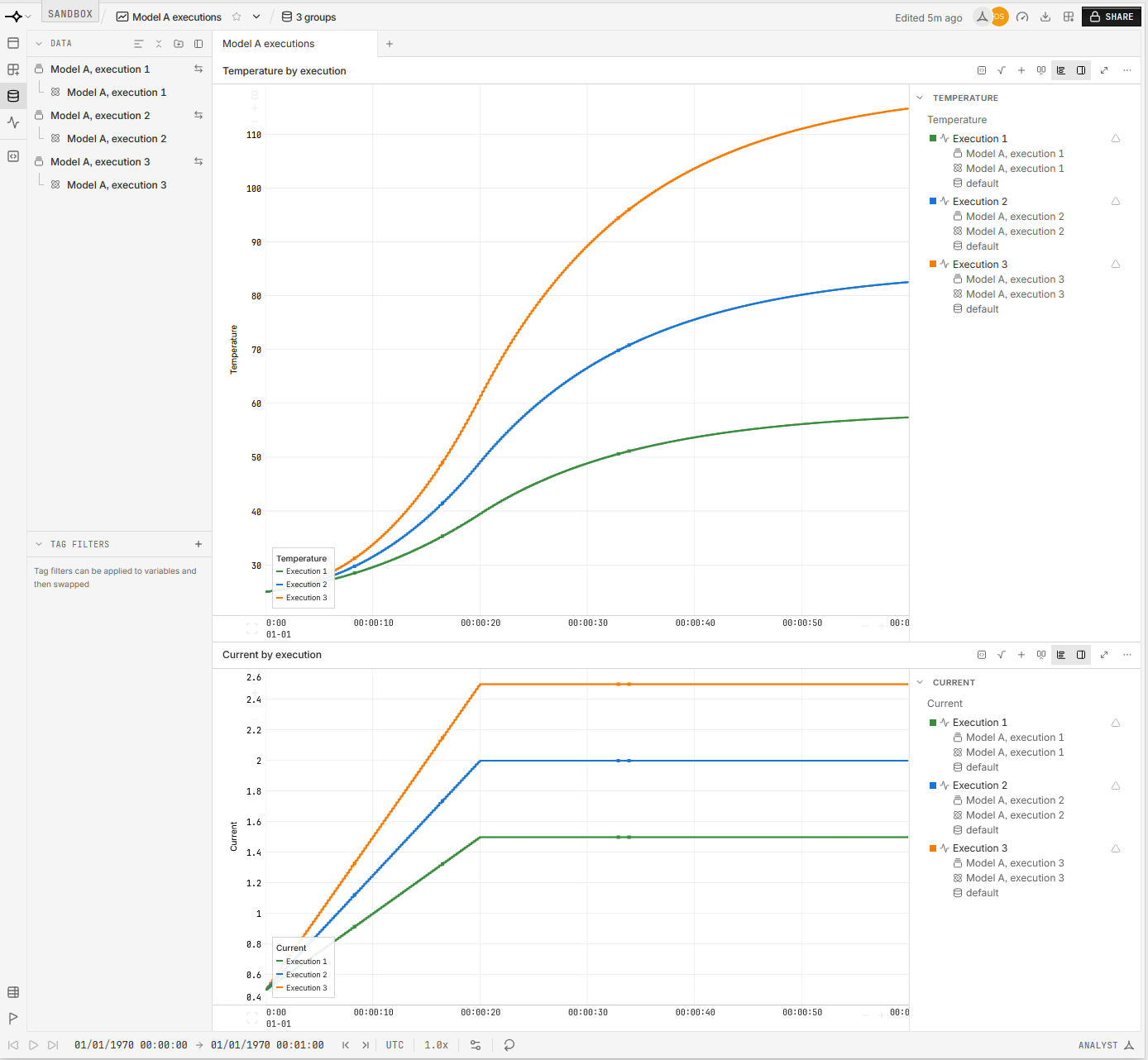
Open a workbook from one execution’s run, add the other runs in its **DATA** panel (see [Line up tests on one timeline](https://dev.nominal.io/platform/data-model/paradigms/stories/post-test.md#line-up-tests)), and plot the same channels. Because every execution starts at time zero, the runs overlay as they are. A [checklist](https://dev.nominal.io/platform/reference/glossary.md#checklist "A versioned set of checks that you execute on runs or assets to evaluate test data during or after a test.") [executed on each run](https://dev.nominal.io/platform/data-model/paradigms/stories/automated-checks.md#check-a-test-after-it-ends) gives every execution its own [check](https://dev.nominal.io/platform/reference/glossary.md#check "A rule that evaluates time-series data against a condition, such as a threshold or a state change, and creates an event wherever the condition is met.") results.
## Next steps
- [Simulations](https://dev.nominal.io/platform/data-model/organization/simulation.md): the full approach, including both extensions.
- [Repeatable test execution](https://dev.nominal.io/platform/data-model/paradigms/stories/repeatable-runs.md): how to organize the physical tests once the hardware arrives.
- [🔒︎Automate testing with procedures](https://docs.nominal.io/core/documentation/platform/automate-testing-procedures): if you’re writing test procedures ahead of the hardware too.