# Handle transitions between approaches
Data organized with one approach can move to another as your testing changes, and the data you’ve already recorded stays where it is. This page covers moving from the [tagged approach](https://dev.nominal.io/platform/data-model/organization/tagged-data.md), where one dataset holds many units’ data tagged by unit, toward assets and datasets for each unit. Use it when moving from [test station development](https://dev.nominal.io/platform/data-model/paradigms/stories/test-engineer.md) to [repeatable test execution](https://dev.nominal.io/platform/data-model/paradigms/stories/repeatable-runs.md), or whenever the units on a shared dataset need histories of their own.
## Giving each unit an asset
Once you test units the same way again and again, give each [unit under test](https://dev.nominal.io/platform/reference/glossary.md#unit-under-test-uut "The device or system being tested, also called a device under test (DUT).") an [asset](https://dev.nominal.io/platform/reference/glossary.md#asset "A physical or simulated device or system you track in Nominal, such as a vehicle, a component, a unit under test, or a test stand.") of its own that filters the shared [dataset](https://dev.nominal.io/platform/reference/glossary.md#dataset "A store in Nominal for time-series and log data, which grows as you upload or stream more into it.") by the unit’s [tag](https://dev.nominal.io/platform/reference/glossary.md#tag "A key-value pair on your data points, such as motor_id: 1, that lets you filter a subset of points from a single dataset."). Then mark each test with a [run](https://dev.nominal.io/platform/reference/glossary.md#run "A named, time-bounded period of interest on one or more assets, such as a test, a flight, or a race session.") on the unit’s asset, as in the [walkthrough](https://dev.nominal.io/platform/data-model/paradigms/stories/test-engineer-stabilizing.md#walkthrough-add-an-asset-for-each-unit) below. In this example, the shared dataset is a test station’s, tagged by board.
```mermaid
---
config:
layout: elk
---
flowchart BT
classDef green fill:#dcfce7,stroke:#15803d,color:#1f2937
classDef red fill:#fee2e2,stroke:#b91c1c,color:#1f2937
classDef purple fill:#e0e7ff,stroke:#4338ca,color:#1f2937
classDef darkgreen fill:#bbf7d0,stroke:#15803d,color:#1f2937
subgraph dataset1["Dataset: Test station"]
raw["Monday
board=A
09:00:00 · 12.1
...
Tuesday
board=B
10:30:00 · 11.8
..."]:::purple
end
style dataset1 fill:#f5f7ff,stroke:#4338ca,color:#1f2937
station["Asset: Test station"]:::darkgreen
dataset1 -->|"ref name=default"| station
assetA["Asset: Board A"]:::green
dataset1 -->|"ref name=default
filter board=A"| assetA
assetB["Asset: Board B"]:::green
dataset1 -->|"ref name=default
filter board=B"| assetB
runA["Run: Test 1
on Board A"]:::red
assetA --> runA
runB["Run: Test 1
on Board B"]:::red
assetB --> runB
click station,assetA,assetB href "../../../#asset" "Asset"
click dataset1 href "../../../#time-series-data" "Time-series data"
click runA,runB href "../../../#runs" "Runs"
```
The station’s own asset is still linked to every point the station has recorded, so you can keep [monitoring the station’s health](https://dev.nominal.io/platform/data-model/paradigms/stories/test-engineer.md#monitor-the-station-itself).
## Walkthrough: add an asset for each unit
When you’re ready to track each unit on its own:
1. In the sidebar, click **Assets**, then **NEW ASSET**, and name the asset after the unit.
2. Under **Data sources**, click **ADD DATA SOURCE** and pick the shared dataset.
3. Set the **Refname** to `default`, click **ADD TAG FILTERS**, and choose the tag, then the unit’s value, for example `board` = `A`.
4. Click **SAVE TO ASSET**, then **CREATE ASSET**.
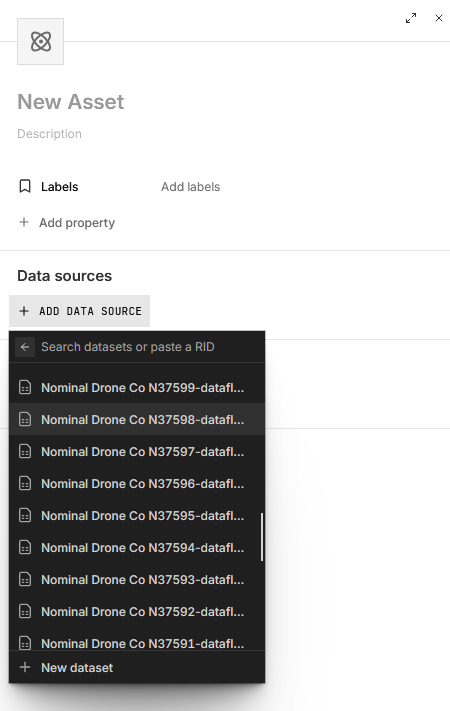
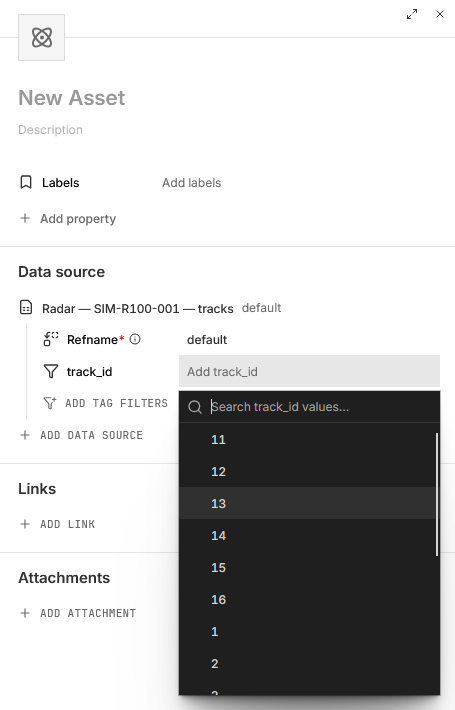
In code, the [tagged approach](https://dev.nominal.io/platform/data-model/organization/tagged-data.md#tagged-data-code) shows the same setup in Python, Rust, MATLAB, and Go.
Then record each test as a run on the unit’s asset:
1. On the asset’s page, click the arrow beside **NEW WORKBOOK** in the top right and choose **New run**. You can also create a run by selecting the Runs tab and pressing **NEW RUN**.
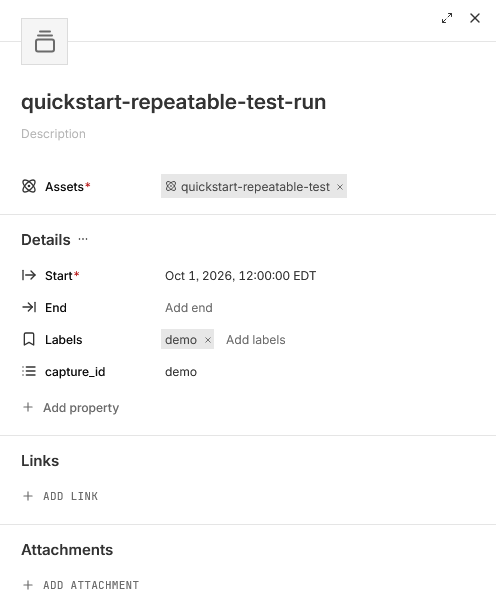
2. Give the run a title, and set its **Start** to when the test began. Leave **End** empty while the test is running. If the test is already over, set **End** too, or, if the asset’s files cover the test, click **Add files** under **Determine bounds with files** and pick the files to set both from them.
3. Add [labels](https://dev.nominal.io/platform/reference/glossary.md#label "A short piece of text for grouping, searching, and filtering assets, runs, data sources, and events, such as prototype or night-flight.") and properties for the test, such as the procedure or its revision, and click **CREATE RUN**.
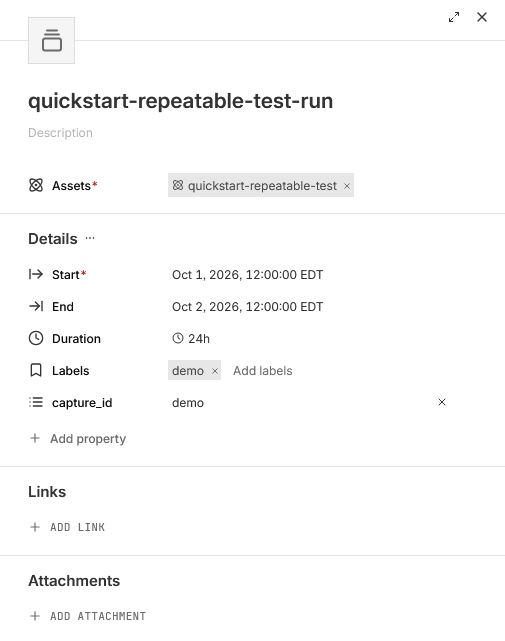
4. If you left **End** empty, set it under **Details** on the run’s page once the test is over and its data is in.
## Giving each unit a dataset of its own
Per-unit [assets](https://dev.nominal.io/platform/reference/glossary.md#asset "A physical or simulated device or system you track in Nominal, such as a vehicle, a component, a unit under test, or a test stand.") on the shared dataset, as above, already give each unit its own runs and history. If the units become long-lived, tested across many campaigns, or have untagged data unique to the unit, give each unit a dataset of its own as well. This [combines the default and tagged approaches](https://dev.nominal.io/platform/data-model/organization/combined.md). The shared source keeps writing to its tagged dataset, and each unit’s dataset holds what belongs to the unit, such as an onboard computer’s internal readings in a [hardware-in-the-loop](https://dev.nominal.io/platform/reference/glossary.md#hardware-in-the-loop-hil-hitl-hwil-testing "Testing where real hardware, such as a unit under test's controller, runs against simulated inputs from a test stand.") test, or its tests on other stations.
Attach the unit’s dataset to its asset under a [ref name](https://dev.nominal.io/platform/reference/glossary.md#ref-name "The name an asset or run gives each data source attached to it, such as default. Workbooks and checklists find channels by ref name and channel name.") of its own, such as `unit`. The shared dataset keeps the ref name `default`, so the [workbooks](https://dev.nominal.io/platform/reference/glossary.md#workbook "Where you analyze time-series data from assets and runs, in tabs and panels, after a test or live.") you already have keep working. The shared source’s own asset still sees every point the source records, so monitoring it, such as [monitoring a test station](https://dev.nominal.io/platform/data-model/paradigms/stories/test-engineer.md#monitor-the-station-itself), is unchanged.
What decides whether a unit needs a dataset of its own is where its data comes from, not how many stations it passes through. If every measurement comes from test stations that tag it with the unit, one tagged dataset is enough, even across stations. The tagged approach’s [multi-tester extension](https://dev.nominal.io/platform/data-model/organization/tagged-data.md#units-run-through-multiple-testers) keeps one dataset for the whole [production line](https://dev.nominal.io/platform/reference/glossary.md#production-line "The sequence of stations a product moves through as it's built and tested. A production line can have many test stands, each running part of the test plan on every unit.") and tags each point with both its unit and its [tester](https://dev.nominal.io/platform/reference/glossary.md#tester "Another name for a test stand: the equipment that runs tests on a unit under test."). If a file or stream comes from the unit itself rather than the shared source, give the unit its own dataset.
```mermaid
---
config:
layout: elk
---
flowchart BT
classDef green fill:#dcfce7,stroke:#15803d,color:#1f2937
classDef purple fill:#e0e7ff,stroke:#4338ca,color:#1f2937
classDef darkgreen fill:#bbf7d0,stroke:#15803d,color:#1f2937
stationData[("Dataset
Test station
Tagged by board")]:::purple
station["Asset: Test station"]:::darkgreen
stationData -->|"ref name=default
no filter"| station
assetC["Asset: Board C"]:::green
stationData -->|"ref name=default
filter board=C"| assetC
datasetC[("Dataset
Board C")]:::purple
datasetC -->|"ref name=unit"| assetC
assetD["Asset: Board D"]:::green
stationData -->|"ref name=default
filter board=D"| assetD
datasetD[("Dataset
Board D")]:::purple
datasetD -->|"ref name=unit"| assetD
click station,assetC,assetD href "../../../#asset" "Asset"
click stationData,datasetC,datasetD href "../../../#time-series-data" "Time-series data"
```
## Walkthrough: give each unit its own dataset
Upload data unique to a specific unit:
1. In the sidebar, click **+** (**New**), then **Upload data**, and add the unit’s files.
2. Click **SELECT A DESTINATION**, choose **Link to an existing asset**, and pick the unit.
3. In **Organize your data**:
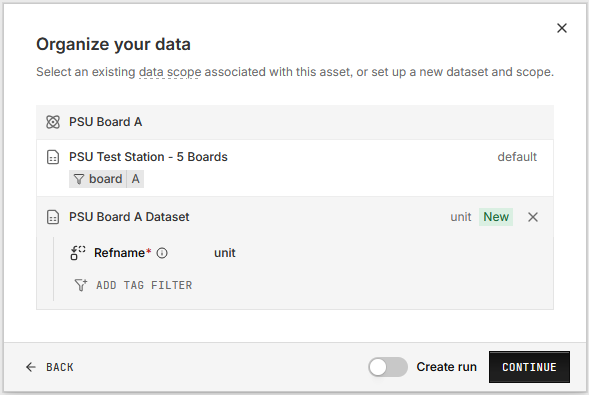
- The first time, click **ADD DATA**, then **New dataset**, and name it after the unit. The sheet warns that the asset already has a dataset, but this one holds the unit’s own channels, so click **CREATE DATASET**. Under **Refname**, type `unit` and click **Create “unit”**.
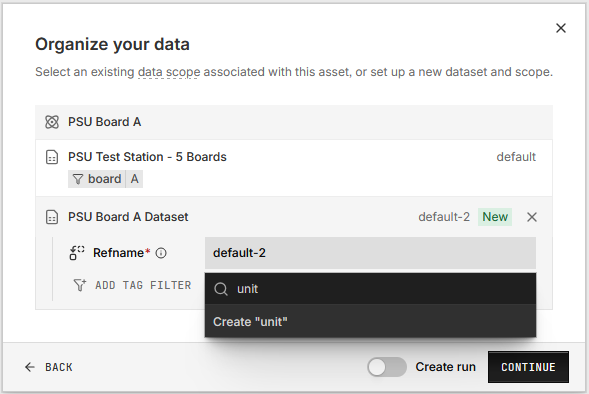
- After that, click the unit’s existing `unit` [data scope](https://dev.nominal.io/platform/reference/glossary.md#data-scope "The link between an asset or run and a data source, named by its ref name. It can filter the data source by tags and shift its timestamps.").
4. Click **CONTINUE** and check the timestamp in the **Settings** panel. Turn on **Create run**, name the run, and click **CREATE RUN**, then click **CONFIRM & INGEST**.
In Python:
```python
from nominal.core import NominalClient
client = NominalClient.from_profile("default")
unit = client.get_asset("") # the unit's asset
dataset = unit.get_or_create_dataset("unit", name="Board C") # the unit's own data, under the ref name unit
```