

SQL REST API quickstart#
Go from an API key to your first exported query result. Each request below is shown three ways: as a cURL or PowerShell command that returns CSV, and as Python that reads Arrow.
Prerequisites#
Each step below is shown three ways, and the tabs ask for different formats from the REST API. The cURL and PowerShell examples set result_format to CSV, which needs no decoding. The Python examples leave it unset and get the default Arrow stream. See Result formats for more information.
For the cURL path, all you need is cURL itself, which ships with macOS, most Linux distributions, and Windows 10 and later. Those examples ask the REST API for CSV, which is human-readable.
For the PowerShell path, nothing to install: Invoke-RestMethod is built in.
For the Python path, you need Python 3.11 or later plus three libraries: the Nominal Python client, which reads your credentials, and two for the requests and their results. Python examples request Arrow rather than CSV, because Arrow carries column types and loads directly into pandas or Polars:
pip install nominal pyarrow requests
Warning
On Windows, use the PowerShell tab rather than the cURL one. In PowerShell, curl is an alias for Invoke-WebRequest rather than the real cURL, and quoting rules differ from POSIX shells, so the cURL examples will not run as written.
Gather your Nominal credentials#
Copy your workspace RID, API key, and REST API URL from the Nominal app. Each cURL and PowerShell example below sets them in its first lines, so paste yours in there. The Python examples read them from the default profile in your Nominal config file. If you haven’t created it yet, follow API keys setup, which stores the same three values.
Where to find these values
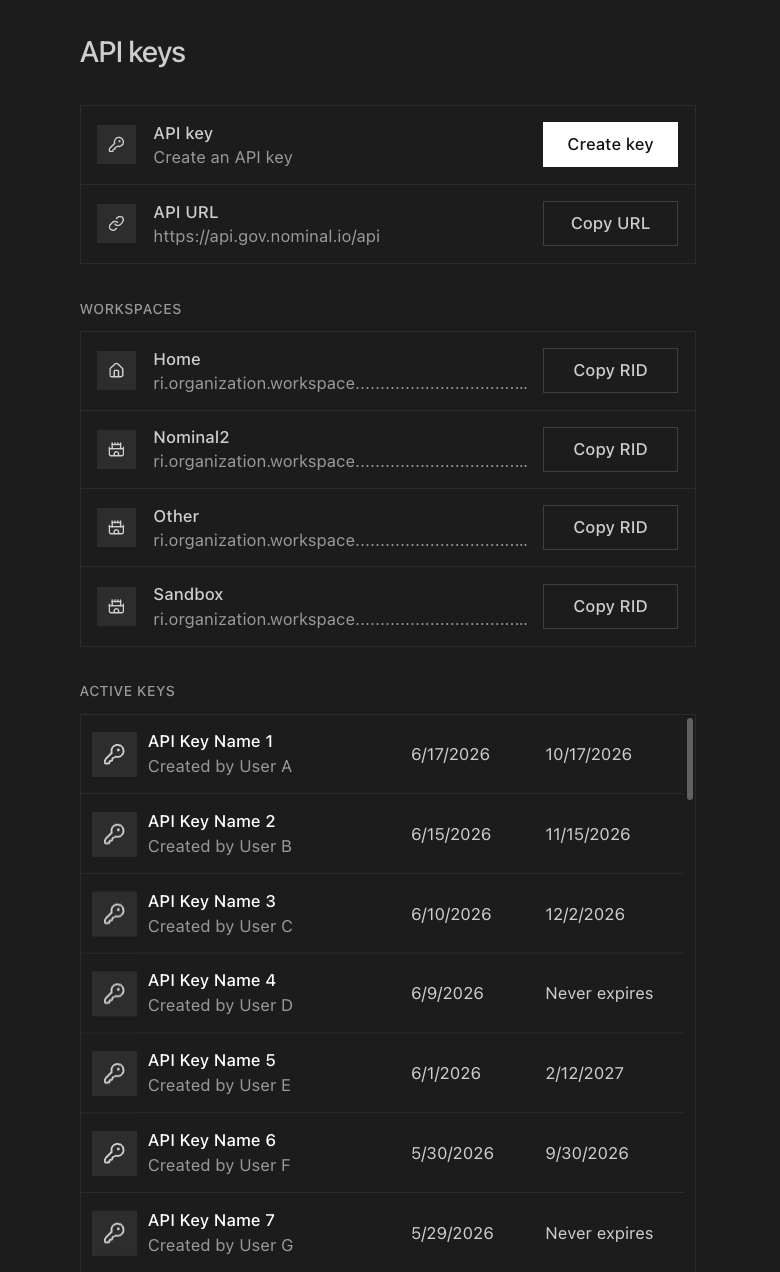
Open your organization’s API keys page in Settings:
API key: Click CREATE KEY, name it, set an expiration, and click GENERATE KEY. Copy the key. You won’t be able to see it again. Store your API key securely to protect your Nominal data.
REST API URL: On the same page, find API URL and click COPY URL.
Workspace RID: On the same page, find your workspace under WORKSPACES and click COPY RID.
Find a dataset to query#
Telemetry queries must name the dataset(s) they read, so start by listing the datasets in your workspace. The datasets table needs no scoping:
Ask for CSV so the result prints straight to your terminal:
API_URL='https://api.gov.nominal.io/api'
API_KEY='<api key>'  # DO NOT COMMIT THIS
WORKSPACE_RID='<ri.security.instance.workspace.identifier>'

curl --request POST "$API_URL/sql/v1/query" \
  --header "Authorization: Bearer $API_KEY" \
  --header 'Content-Type: application/json' \
  --fail-with-body \
  --data "{
    \"query\": \"SELECT dataset_rid, name FROM datasets LIMIT 20\",
    \"workspace_rid\": \"$WORKSPACE_RID\",
    \"result_format\": \"SQL_SERVICE_QUERY_RESULT_FORMAT_CSV\"
  }"
"dataset_rid","name"
"ri.catalog.example.dataset.7c...a7","endurance"
"ri.catalog.example.dataset.e5...7b","shakedown"
$apiUrl = 'https://api.gov.nominal.io/api'
$apiKey = '<api key>'  # DO NOT COMMIT THIS
$workspaceRid = '<ri.security.instance.workspace.identifier>'

$body = @{
  query         = "SELECT dataset_rid, name FROM datasets LIMIT 20"
  workspace_rid = $workspaceRid
  result_format = "SQL_SERVICE_QUERY_RESULT_FORMAT_CSV"
} | ConvertTo-Json

Invoke-RestMethod -Method Post -Uri "$apiUrl/sql/v1/query" `
  -Headers @{ Authorization = "Bearer $apiKey" } `
  -ContentType 'application/json' `
  -Body $body
Returns the same CSV as the cURL tab.
import pyarrow as pa
import requests
from nominal.config import NominalConfig

profile = NominalConfig.from_yaml().get_profile("default")

response = requests.post(
    f"{profile.base_url}/sql/v1/query",
    headers={"Authorization": f"Bearer {profile.token}"},
    json={
        "query": "SELECT dataset_rid, name FROM datasets LIMIT 20",
        "workspace_rid": profile.workspace_rid,
    },
)
response.raise_for_status()

table = pa.ipc.open_stream(pa.py_buffer(response.content)).read_all()
for row in table.to_pylist():
    print(row["dataset_rid"], row["name"])
Pick a dataset_rid from the result, and paste it into the dataset RID line at the top of each example below.
Run your first telemetry query#
Now read telemetry from that dataset:
API_URL='https://api.gov.nominal.io/api'
API_KEY='<api key>'  # DO NOT COMMIT THIS
WORKSPACE_RID='<ri.security.instance.workspace.identifier>'
DATASET_RID='<ri.catalog.instance.dataset.identifier>'

curl --request POST "$API_URL/sql/v1/query" \
  --header "Authorization: Bearer $API_KEY" \
  --header 'Content-Type: application/json' \
  --fail-with-body \
  --data "{
    \"query\": \"SELECT ts, channel, value FROM points_double WHERE dataset_rid = '$DATASET_RID' ORDER BY ts LIMIT 100\",
    \"workspace_rid\": \"$WORKSPACE_RID\",
    \"result_format\": \"SQL_SERVICE_QUERY_RESULT_FORMAT_CSV\"
  }"
"ts","channel","value"
"2026-07-17T21:24:40.107000064Z","channel_a",0
"2026-07-17T21:24:40.107000064Z","channel_b",0
"2026-07-17T21:24:40.144999936Z","channel_a",7.114995682427262
"2026-07-17T21:24:40.144999936Z","channel_b",7.114995682427262
"2026-07-17T21:24:40.150000128Z","channel_a",-0.2923734171138021
"2026-07-17T21:24:40.150000128Z","channel_b",-0.2923734171138021
Timestamps are ISO 8601 in UTC, with their full nanosecond precision.
The query reads every channel in the dataset, so each timestamp repeats once per channel. Add AND channel = '<channel-name>' to follow a single one, and see Filtering for narrowing further.
$apiUrl = 'https://api.gov.nominal.io/api'
$apiKey = '<api key>'  # DO NOT COMMIT THIS
$workspaceRid = '<ri.security.instance.workspace.identifier>'
$datasetRid = '<ri.catalog.instance.dataset.identifier>'

$body = @{
  query         = "SELECT ts, channel, value FROM points_double WHERE dataset_rid = '$datasetRid' ORDER BY ts LIMIT 100"
  workspace_rid = $workspaceRid
  result_format = "SQL_SERVICE_QUERY_RESULT_FORMAT_CSV"
} | ConvertTo-Json

Invoke-RestMethod -Method Post -Uri "$apiUrl/sql/v1/query" `
  -Headers @{ Authorization = "Bearer $apiKey" } `
  -ContentType 'application/json' `
  -Body $body
import datetime

import pyarrow as pa
import requests
from nominal.config import NominalConfig

NOMINAL_DATASET_RID = "<ri.catalog.instance.dataset.identifier>"

profile = NominalConfig.from_yaml().get_profile("default")

query = f"""
SELECT ts, channel, value
FROM points_double
WHERE dataset_rid = '{NOMINAL_DATASET_RID}'
ORDER BY ts
LIMIT 100
"""

response = requests.post(
    f"{profile.base_url}/sql/v1/query",
    headers={"Authorization": f"Bearer {profile.token}"},
    json={
        "query": query,
        "workspace_rid": profile.workspace_rid,
    },
)
response.raise_for_status()

table = pa.ipc.open_stream(pa.py_buffer(response.content)).read_all()
print(table.schema)
print(table.num_rows, "rows")

timestamps = table.column("ts")
channels = table.column("channel")
values = table.column("value")

for i in range(min(5, table.num_rows)):
    # ts arrives as nanosecond-precision Arrow, which Python's datetime cannot
    # represent, so it has to be read as an integer and converted by hand.
    moment = datetime.datetime.fromtimestamp(timestamps[i].value / 1e9, datetime.timezone.utc)
    print(f"{moment.isoformat()} {channels[i].as_py()}\t\t{values[i].as_py()}")
Note
Queries are read-only and limited to a single SELECT, and telemetry tables always require a dataset_rid. See the SQL REST API for the full interface.
Export the result#
You now have a telemetry query that returns the data you care about, cut to the first 100 rows by the LIMIT. To take the whole result with you as a file, drop the LIMIT and send the query to the export endpoint. It executes the query and writes the complete result to object storage, returning a presigned URL to download it:
The export response is JSON, so it prints safely:
API_URL='https://api.gov.nominal.io/api'
API_KEY='<api key>'  # DO NOT COMMIT THIS
WORKSPACE_RID='<ri.security.instance.workspace.identifier>'
DATASET_RID='<ri.catalog.instance.dataset.identifier>'

curl --request POST "$API_URL/sql/v1/query/export" \
  --header "Authorization: Bearer $API_KEY" \
  --header 'Content-Type: application/json' \
  --data "{
    \"query\": \"SELECT ts, channel, value FROM points_double WHERE dataset_rid = '$DATASET_RID' ORDER BY ts\",
    \"workspace_rid\": \"$WORKSPACE_RID\"
  }"
Copy the presignedUrl value out of the response and download the CSV:
curl --fail-with-body --output export.csv '<presignedUrl-from-the-response>'
Be sure to keep the URL in quotes.
You can also open the presignedUrl in a browser. The URL is time-limited.
$apiUrl = 'https://api.gov.nominal.io/api'
$apiKey = '<api key>'  # DO NOT COMMIT THIS
$workspaceRid = '<ri.security.instance.workspace.identifier>'
$datasetRid = '<ri.catalog.instance.dataset.identifier>'

$body = @{
  query         = "SELECT ts, channel, value FROM points_double WHERE dataset_rid = '$datasetRid' ORDER BY ts"
  workspace_rid = $workspaceRid
} | ConvertTo-Json

$response = Invoke-RestMethod -Method Post -Uri "$apiUrl/sql/v1/query/export" `
  -Headers @{ Authorization = "Bearer $apiKey" } `
  -ContentType 'application/json' `
  -Body $body

Invoke-WebRequest -Uri $response.presignedUrl -OutFile export.csv
Invoke-RestMethod parses the JSON response, so $response.presignedUrl reaches the download step without you copying the URL by hand.
import requests
from nominal.config import NominalConfig

NOMINAL_DATASET_RID = "<ri.catalog.instance.dataset.identifier>"

profile = NominalConfig.from_yaml().get_profile("default")

query = f"""
SELECT ts, channel, value
FROM points_double
WHERE dataset_rid = '{NOMINAL_DATASET_RID}'
ORDER BY ts
"""

response = requests.post(
    f"{profile.base_url}/sql/v1/query/export",
    headers={"Authorization": f"Bearer {profile.token}"},
    json={
        "query": query,
        "workspace_rid": profile.workspace_rid,
    },
)
response.raise_for_status()
url = response.json()["presignedUrl"]

with open("export.csv", "wb") as destination:
    destination.write(requests.get(url).content)
Note
Export works for queries over the metadata tables as well as the telemetry tables. See Export for the options.
Next steps#
Start writing queries against the SQL REST API.