

Intro to Nominal Clients#
Clients allow you to interact with the Nominal platform programtically.
If you already know which language/client you will be using, see the specific Docs by Connector.
To determine which client will suit your needs see Choose Your Client.
For how Nominal stores your data and how to organize it for the way you test, see Nominal platform.
Example#
The example below shows how to upload data to Nominal. To run it , you must first install your client, set up your API keys, and find your dataset’s RID.
from nominal.core import NominalClient

client = NominalClient.from_profile("default")
dataset = client.get_dataset("<ri.catalog.instance.dataset.identifier>")  # or client.create_dataset("My dataset")

file = dataset.add_tabular_data("sample.csv", timestamp_column="timestamp", timestamp_type="iso_8601")  # also Parquet
file.poll_until_ingestion_completed()  # raises NominalIngestError if the ingest fails
client = nominal.Client.fromProfile();
dataset = client.datasetByRid("<ri.catalog.instance.dataset.identifier>");

job = client.ingest("sample.csv", TimestampColumn="timestamp", Dataset=dataset);  % or NewDataset="My dataset"
job.wait();  % raises if the ingest fails
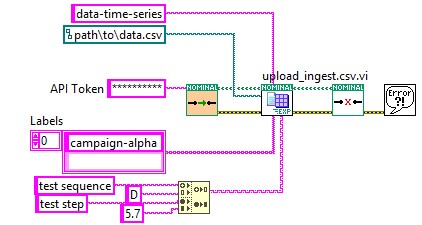
use nominal::core::{CsvIngest, Timestamp};

let client = nominal::NominalClient::from_profile("default")?;
client.ingest()
    .upload_csv("sample.csv", "<ri.catalog.instance.dataset.identifier>", CsvIngest::new(Timestamp::iso8601("timestamp")))
    .await?;
import (
	"bytes"
	"os"

	ingestapi "github.com/nominal-io/nominal-api-go/ingest/api"
	uploadapi "github.com/nominal-io/nominal-api-go/upload/api"
	"github.com/palantir/conjure-go-runtime/v2/conjure-go-client/httpclient"
	"github.com/palantir/pkg/rid"
	"github.com/palantir/pkg/safelong"
)

// httpClient is a conjure-go-runtime httpclient.Client for your Nominal REST API URL,
// and token is your API key as a bearertoken.Token
data, _ := os.ReadFile("sample.csv")
size := safelong.SafeLong(len(data))
path, _ := uploadapi.NewUploadServiceClient(httpClient).UploadFile(ctx, token, "sample.csv", &size, nil,
	httpclient.RequestBodyInMemory(bytes.NewReader(data)))
datasetRid, _ := rid.ParseRID("<ri.catalog.instance.dataset.identifier>")
ingestapi.NewIngestServiceClient(httpClient).Ingest(ctx, token, ingestapi.IngestRequest{
	Options: ingestapi.NewIngestOptionsFromCsv(ingestapi.CsvOpts{
		Source: ingestapi.NewIngestSourceFromS3(ingestapi.S3IngestSource{Path: string(path)}),
		Target: ingestapi.NewDatasetIngestTargetFromExisting(ingestapi.ExistingDatasetIngestDestination{DatasetRid: datasetRid}),
		TimestampMetadata: ingestapi.TimestampMetadata{
			SeriesName:    "timestamp",
			TimestampType: ingestapi.NewTimestampTypeFromAbsolute(ingestapi.NewAbsoluteTimestampFromIso8601(ingestapi.Iso8601Timestamp{})),
		},
	}),
})
nomctl ingest csv sample.csv --timestamp-column timestamp --timestamp-type iso8601 \
  --dataset <ri.catalog.instance.dataset.identifier>  # or --name "My dataset"
See more Examples to see how the clients compare, or Choose Your Client.
Install#
Install the client for your language or tool:
pip install nominal
pip install instro # or "instro[all]" for every instrument driver
Download NominalForMATLAB-<version>.mltbx from the latest release, then install it (or double-click the file):
matlab.addons.install("NominalForMATLAB-<version>.mltbx")
Install the Nominal.io Client package with VIPM, the package manager for LabVIEW.
cargo add nominal
cargo add tokio --features macros,rt-multi-thread
Install the Nominal Blockset toolbox as its Install page describes.
Then set up your API keys and find your dataset’s RID.