

Stream data to Nominal#
Once you have set up your API keys, you can stream data to a Nominal dataset from code.
Each example streams to a dataset you pick by its RID. To get one, find your dataset’s RID.
from datetime import datetime, timezone
from nominal.core import NominalClient

client = NominalClient.from_profile("default")

dataset_rid = "<ri.catalog.instance.dataset.identifier>"
dataset = client.get_dataset(dataset_rid)  # or client.create_dataset("My dataset")

# A run with no end stays open, so its workbook can go live
run = client.create_run("Quick look", start=datetime.now(timezone.utc), end=None)
run.add_dataset("default", dataset)  # "default" is the ref name

with dataset.get_write_stream() as stream:
    stream.enqueue("voltage", datetime.now(timezone.utc), 12.1)
# Start the simulator first, in another terminal: python -m instro.dmm.scpi_sim_server
from instro.dmm import InstroDMM
from instro.dmm.drivers import SimulatedDMM  # or Agilent34401A, Keysight34461A, Keithley2400
from instro.lib.publishers import NominalCorePublisher

dataset_rid = "<ri.catalog.instance.dataset.identifier>"

dmm = InstroDMM(
    name="dmm",
    driver=SimulatedDMM("TCPIP0::127.0.0.1::5026::SOCKET"),
    publishers=[NominalCorePublisher(dataset_rid=dataset_rid)],
)
with dmm:
    dmm.read_dc_voltage()  # published to the dataset
dataset_rid = "<ri.catalog.instance.dataset.identifier>";

client = nominal.Client.fromProfile();
dataset = client.datasetByRid(dataset_rid);

% A run starts on an asset; with no end it stays open, so its workbook can go live
asset = client.getOrCreateAsset("My asset");
asset.addDataset(dataset);
r = asset.run("Quick look");

stream = dataset.stream();
voltage = stream.channel("voltage");
voltage.push(datetime("now", TimeZone="UTC"), 12.1);
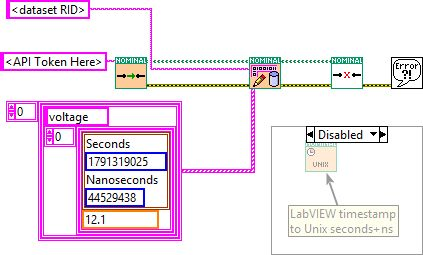
use nominal::core::RunCreate;
use nominal::streaming::prelude::*;
use nominal::streaming::stream::NominalDatasetStreamBuilder;

let client = nominal::NominalClient::from_profile("default")?;
let dataset_rid = "<ri.catalog.instance.dataset.identifier>";
// or create one: client.catalog().create_dataset(DatasetCreate::new("My dataset")).await?.rid()

// A run with no end stays open, so its workbook can go live
let run = client.runs().create(RunCreate::new("Quick look", chrono::Utc::now())).await?;
client.runs().add_dataset(run.rid(), "default", dataset_rid).await?; // "default" is the ref name

// token: your API key, as a BearerToken
let stream = NominalDatasetStreamBuilder::new()
    .stream_to_core(token, ResourceIdentifier::new(dataset_rid)?, tokio::runtime::Handle::current())
    .build();
stream.double_writer(ChannelDescriptor::new("voltage")).push(chrono::Utc::now(), 12.1);
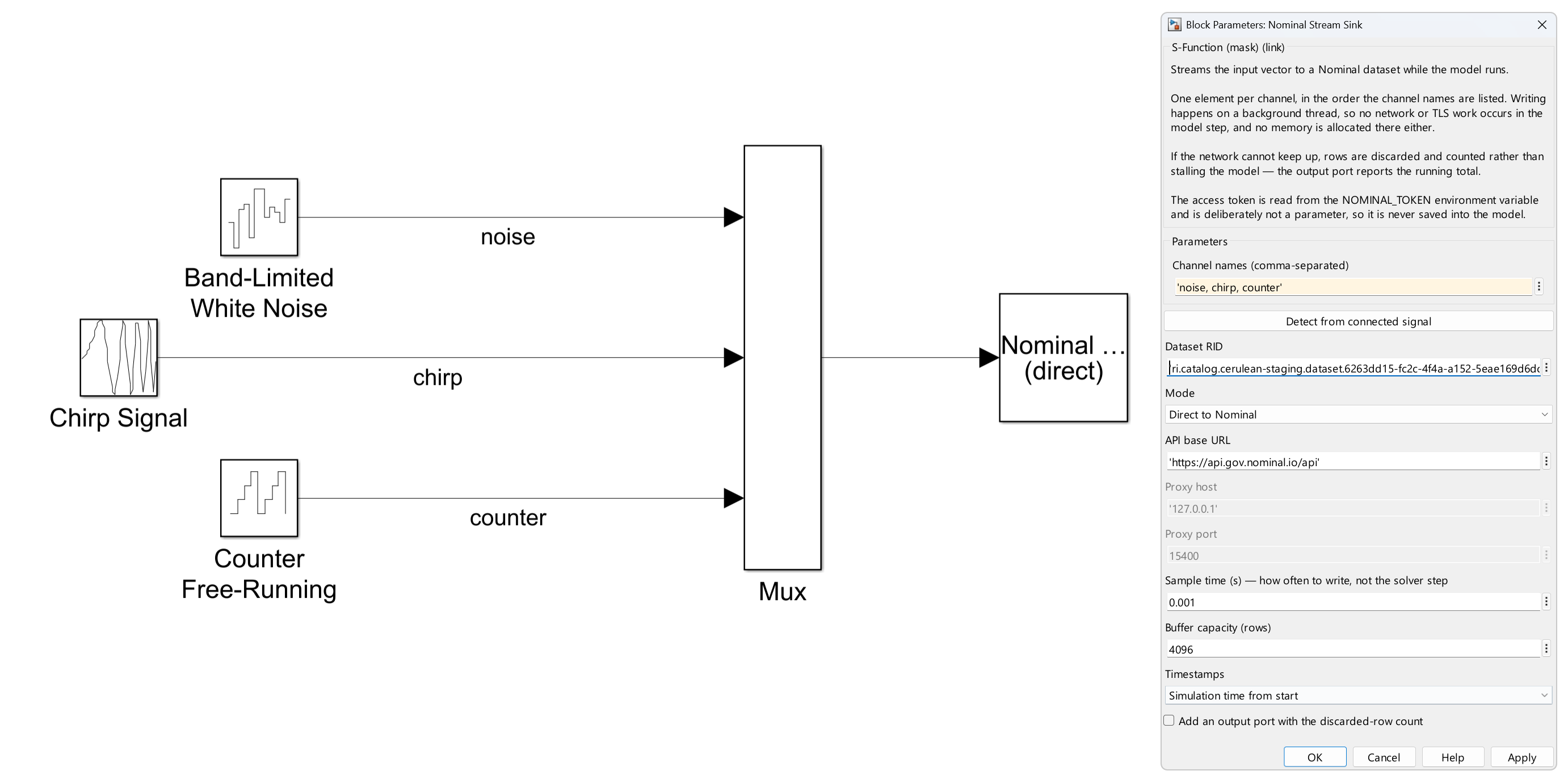
This is the example model from the Nominal Blockset’s Getting Started page. Open it in MATLAB with:
open_system(fullfile(nominal_root, 'examples', 'nominal_stream_example.slx'))
More examples →
Each one shows a single task in code and in the Nominal app, such as uploading a file, creating a run, or tagging data.