

Intro to Nominal MCP#
Connect your agent to Nominal, then build your workflow through prompts.
Connect Your Agent#
Connecting your agent requires a one-time setup.
1. Add the Nominal server:
claude mcp add nominal \
  --transport http \
  https://api.gov.nominal.io/mcp \
  --client-id nominal-mcp \
  --callback-port 54545
2. Run /mcp in Claude Code, select nominal, and choose Authenticate. Finish signing in in the browser that opens.
3. To try it, paste a workbook link and ask:
List the tabs in this workbook and the channels I can plot.
1. In Codex, choose Settings → Configuration → Open config.toml, and add the Nominal server to ~/.codex/config.toml. Keep the first two lines above every [table] header, and leave 54545 unquoted.
mcp_oauth_callback_port = 54545
mcp_oauth_callback_url = "http://localhost:54545/callback"

[mcp_servers.nominal]
url = "https://api.gov.nominal.io/mcp"

[mcp_servers.nominal.oauth]
client_id = "nominal-mcp"
2. Sign in from your terminal:
codex mcp login nominal --scopes mcp:tools
3. To try it, paste a workbook link and ask:
List the tabs in this workbook and the channels I can plot.
Where is the Codex configuration?
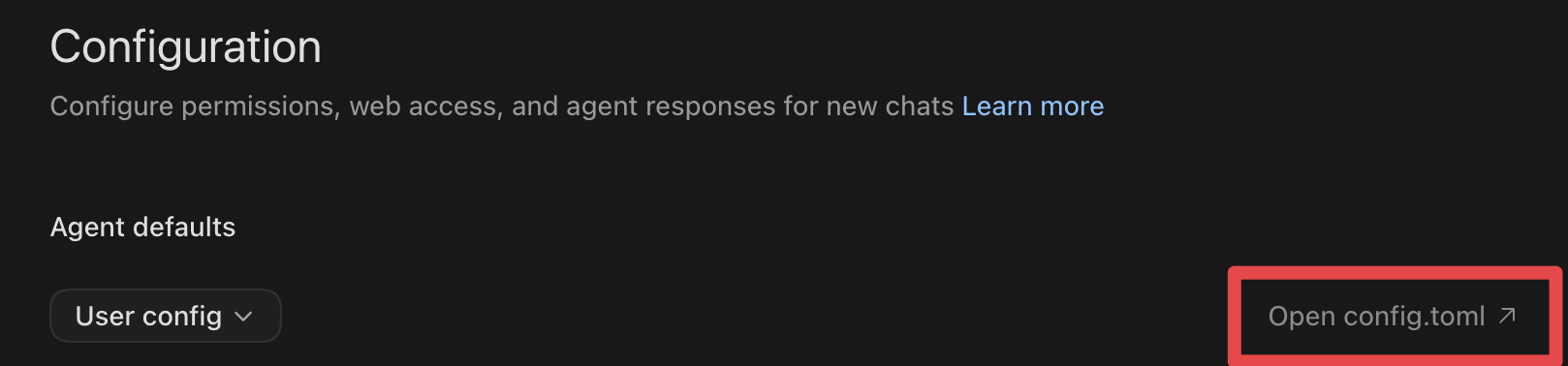
Open your user configuration from Codex Settings.#
Any MCP client that supports OAuth with PKCE can connect. Configure it with:
Setting |
Value |
|---|---|
Server URL |
|
Transport |
Streamable HTTP |
Client ID |
|
Flow |
Authorization Code with PKCE (S256) |
Callback |
The loopback redirect your client uses, for example |
Your client’s MCP documentation has its configuration format.
I’m implementing an MCP client
Send token-exchange parameters, including resource, code, and code_verifier, in the form-encoded request body, not the query string. PKCE with S256 is required.
What can my agent do?
Find and inspect. Search runs and resources, find checklists, and read a workbook’s tabs, panels, and channels.
Edit workbooks. Create a workbook for a run or asset. Add, rename, reorder, and remove tabs; add panels; change layout, axes, colors, markdown, and video settings.
Shape the data. Add runs and assets as inputs, align runs, and create or edit variables.
Check runs. Run a checklist on runs and read the results.
To inspect values, open the workbook in Nominal or use SQL. Nominal-managed and self-hosted deployments expose the same tools.
Issues#
Using a different Nominal host?
The examples use api.gov.nominal.io. If your organization uses a different host, replace it everywhere above.
To find it, click the Settings icon (a gear) at the bottom of Nominal’s sidebar, then API keys, and click COPY URL beside API URL. Replace the trailing /api with /mcp: https://api.gov.nominal.io/api becomes https://api.gov.nominal.io/mcp.
Running a self-hosted deployment?
Your administrator enables either OAuth or API keys on the MCP endpoint. Follow MCP on a self-hosted deployment.
Next#
Add a tab, plot channels on separate axes, and derive a signal, one prompt at a time.
Match the error you see to its fix.