Giving an asset a dataset#
An asset holds its datasets under ref names, so its workbooks, runs, and checklists see their channels. Ask the asset for a dataset by ref name: the first call creates it, and every call after that returns the same one, so an upload script can run again and again. A dataset that already exists can be attached instead, with a tag filter to attach only the points with that tag, as in the tagged approach.
In code#
from nominal.core import NominalClient

client = NominalClient.from_profile("default")
asset = client.get_asset("<ri.scout.instance.asset.identifier>")

dataset = asset.get_or_create_dataset("default")  # the ref name
client = nominal.Client.fromProfile();
asset = client.assetByRid("<ri.scout.instance.asset.identifier>");

dataset = asset.getOrCreateDataset("UUT1 telemetry", "default");  % the dataset's name, then the ref name
Attaching an existing dataset#
from nominal.core import NominalClient

client = NominalClient.from_profile("default")
asset = client.get_asset("<ri.scout.instance.asset.identifier>")
dataset = client.get_dataset("<ri.catalog.instance.dataset.identifier>")

asset.add_dataset("default", dataset, series_tags={"<tag key>": "<tag value>"})  # optional tag filter: only points with this tag
client = nominal.Client.fromProfile();
asset = client.assetByRid("<ri.scout.instance.asset.identifier>");
dataset = client.datasetByRid("<ri.catalog.instance.dataset.identifier>");

asset.addDataset(dataset, "default", Tags=struct("<tag key>", "<tag value>"));  % Tags is optional
let client = nominal::NominalClient::from_profile("default")?;
let asset_rid = "<ri.scout.instance.asset.identifier>";
let dataset_rid = "<ri.catalog.instance.dataset.identifier>";

client.assets().add_dataset(asset_rid, "default", dataset_rid).await?;
// or only the points with one tag value:
// client.assets().add_dataset_with_tags(asset_rid, "default", dataset_rid, [("<tag key>", "<tag value>")]).await?;
import (
	"github.com/nominal-io/nominal-api-go/api/rids"
	nominalapi "github.com/nominal-io/nominal-api-go/io/nominal/api"
	assetapi "github.com/nominal-io/nominal-api-go/scout/asset/api"
	"github.com/nominal-io/nominal-api-go/scout/assets"
	scoutrids "github.com/nominal-io/nominal-api-go/scout/rids/api"
	runapi "github.com/nominal-io/nominal-api-go/scout/run/api"
	"github.com/palantir/pkg/rid"
)

// httpClient is a conjure-go-runtime httpclient.Client for your Nominal REST API URL,
// and token is your API key as a bearertoken.Token
assetRid, _ := rid.ParseRID("<ri.scout.instance.asset.identifier>")
datasetRid, _ := rid.ParseRID("<ri.catalog.instance.dataset.identifier>")
assets.NewAssetServiceClient(httpClient).AddDataScopesToAsset(ctx, token, scoutrids.AssetRid(assetRid),
	assetapi.AddDataScopesToAssetRequest{DataScopes: []assetapi.CreateAssetDataScope{{
		DataScopeName: "default",
		DataSource:    runapi.NewDataSourceFromDataset(rids.DatasetRid(datasetRid)),
		SeriesTags:    map[nominalapi.TagName]nominalapi.TagValue{"<tag key>": "<tag value>"}, // optional
	}}})
In the Nominal app#
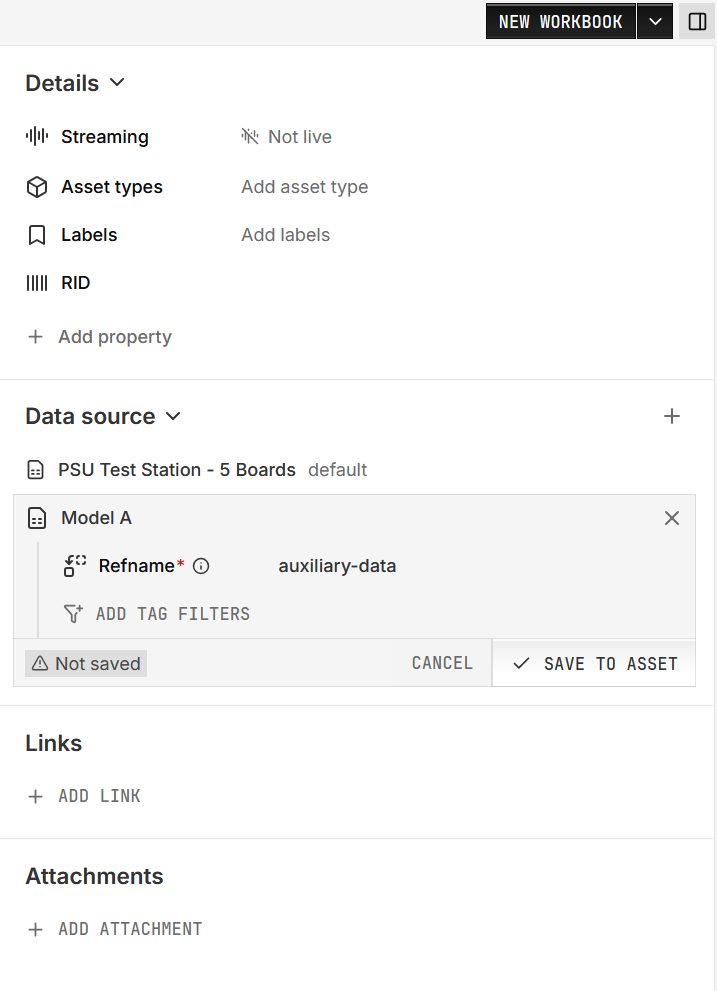
Open the asset. If its properties panel is hidden, open it with the panel icon at the top right, beside NEW WORKBOOK. Find the Data source section.
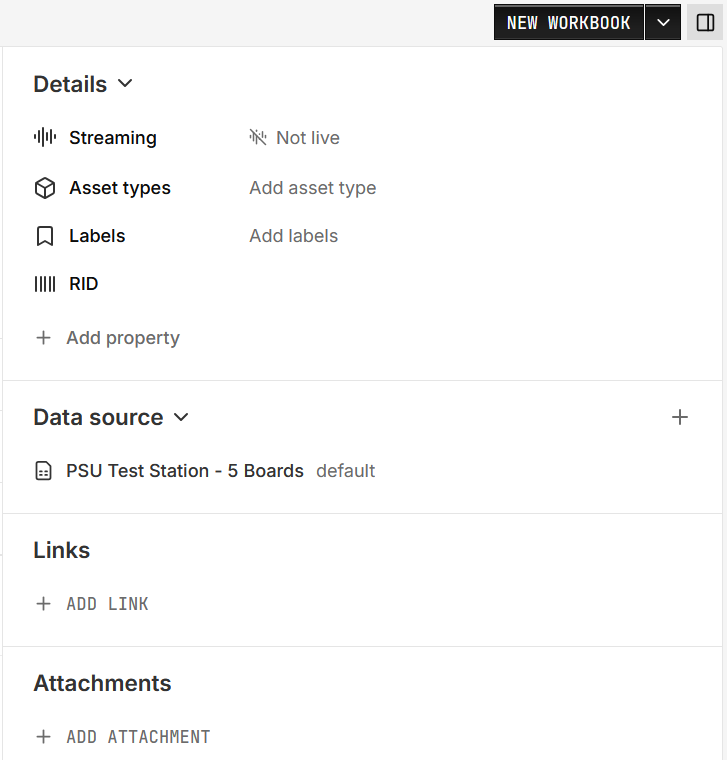
Click + (Add data source) and pick the dataset. If the asset has no data sources yet, click ADD DATA SOURCE instead.
Under Refname, choose or create a ref name.
To attach only part of a shared dataset, click ADD TAG FILTERS, choose the tag key, then click its value and pick the value.
Click SAVE TO ASSET.