

Exporting data#
Download channel data for a time range to use outside Nominal. Each example writes a half-hour window of a dataset’s data to data.csv. The MATLAB and Go examples export its voltage channel.
In code#
from nominal.core import NominalClient
from nominal.thirdparty.pandas import datasource_to_dataframe

client = NominalClient.from_profile("default")
dataset = client.get_dataset("<ri.catalog.instance.dataset.identifier>")

df = datasource_to_dataframe(dataset, start="2026-01-01T14:00:00Z", end="2026-01-01T14:30:00Z")
df.to_csv("data.csv")
client = nominal.Client.fromProfile();
dataset = client.datasetByRid("<ri.catalog.instance.dataset.identifier>");
t0 = datetime("2026-01-01 14:00:00", TimeZone="UTC");
t1 = datetime("2026-01-01 14:30:00", TimeZone="UTC");

dataset.export("data.csv", ["voltage"], t0, t1, Format="csv");
import (
	"io"
	"os"

	nominalapi "github.com/nominal-io/nominal-api-go/io/nominal/api"
	computeapi "github.com/nominal-io/nominal-api-go/scout/compute/api"
	compute "github.com/nominal-io/nominal-api-go/scout/compute/api1"
	exportapi "github.com/nominal-io/nominal-api-go/scout/dataexport/api"
)

// httpClient is a conjure-go-runtime httpclient.Client for your Nominal REST API URL,
// and token is your API key as a bearertoken.Token
channel := computeapi.NewChannelSeriesFromDataSource(computeapi.DataSourceChannel{
	DataSourceRid: computeapi.NewStringConstantFromLiteral("<ri.catalog.instance.dataset.identifier>"),
	Channel:       computeapi.NewStringConstantFromLiteral("voltage"),
})
body, _ := exportapi.NewDataExportServiceClient(httpClient).ExportChannelData(ctx, token, exportapi.ExportDataRequest{
	Format:     exportapi.NewExportFormatFromCsv(exportapi.Csv{}),
	StartTime:  nominalapi.Timestamp{Seconds: 1767276000}, // 2026-01-01T14:00:00Z
	EndTime:    nominalapi.Timestamp{Seconds: 1767277800}, // 2026-01-01T14:30:00Z
	Resolution: exportapi.NewResolutionOptionFromUndecimated(exportapi.UndecimatedResolution{}),
	Channels: exportapi.NewExportChannelsFromTimeDomain(exportapi.ExportTimeDomainChannels{
		OutputTimestampFormat:  exportapi.NewTimestampFormatFromIso8601(exportapi.Iso8601TimestampFormat{}),
		MergeTimestampStrategy: exportapi.NewMergeTimestampStrategyFromNone(exportapi.NoneStrategy{}),
		Channels: []exportapi.TimeDomainChannel{{
			ColumnName:  "voltage",
			ComputeNode: compute.NewSeriesFromNumeric(compute.NewNumericSeriesFromChannel(channel)),
		}},
	}),
})
f, _ := os.Create("data.csv")
io.Copy(f, body)
In the Nominal app#
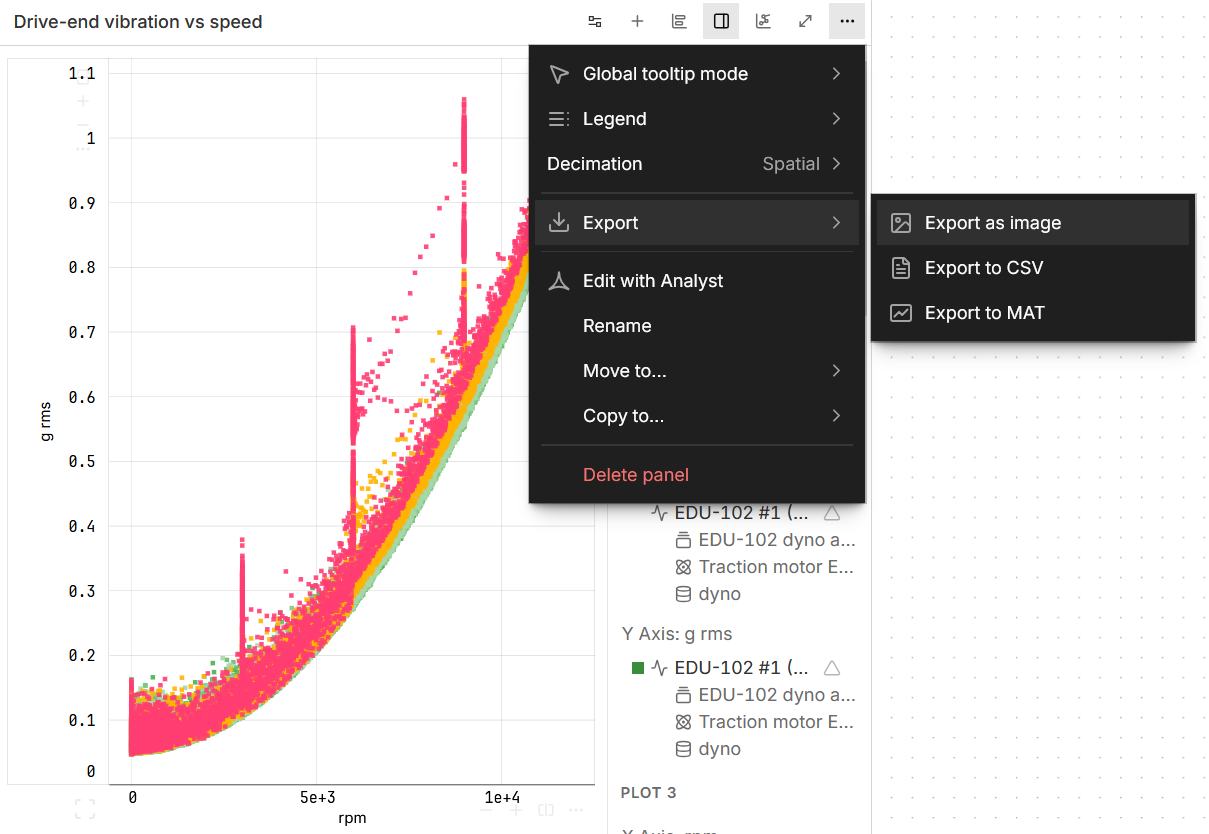
In a workbook, open a chart’s ⋯ menu, then Export, and choose Export to CSV or Export to MAT.
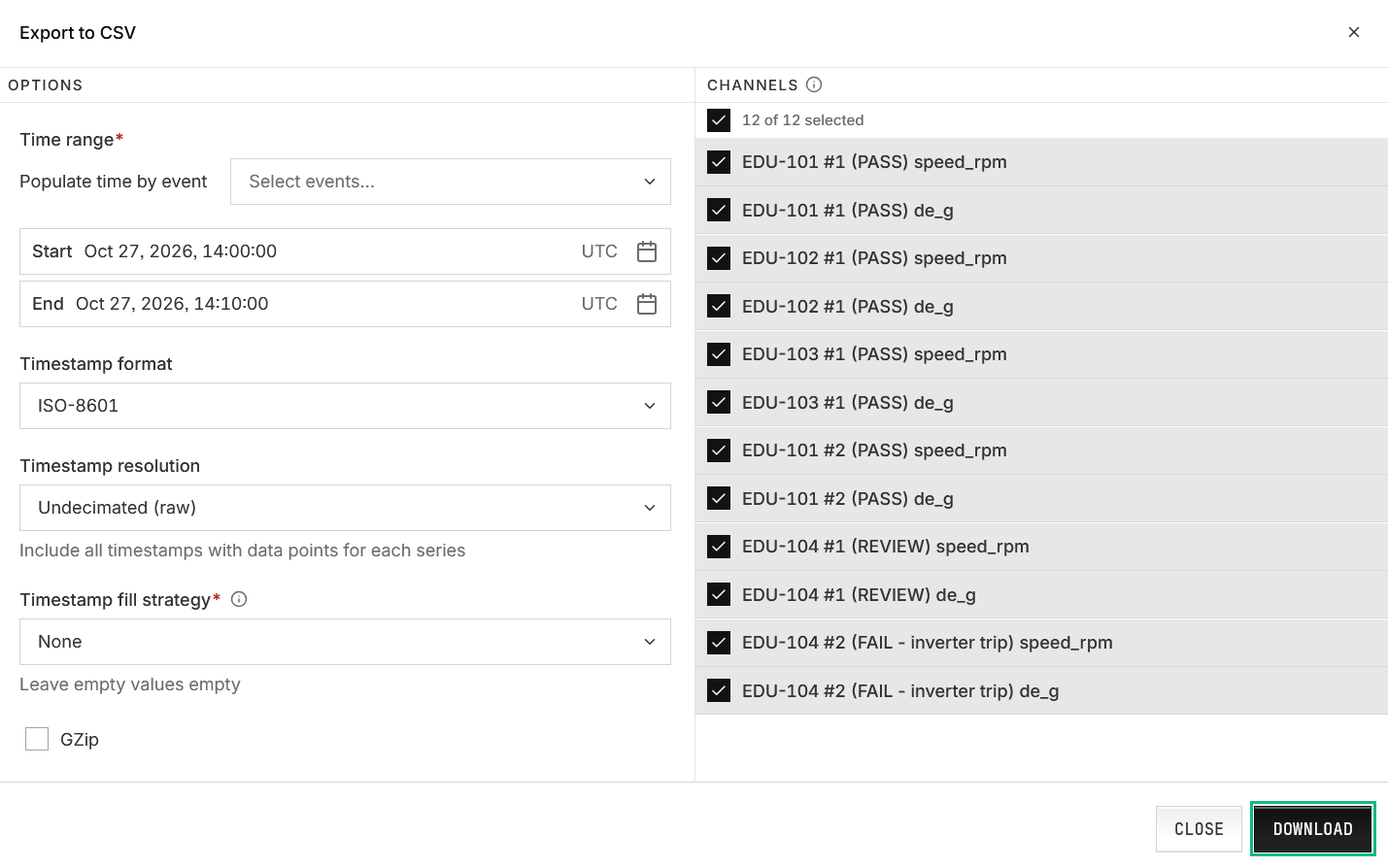
Set the Time range, the Timestamp format, and the Timestamp resolution (raw, or resampled to a frequency or period).
Pick the channels, then click DOWNLOAD.
To export from one of an asset’s data sources instead, open the asset’s Data sources tab, click the Export data icon on that row, and choose Export as CSV or Export as MAT.