

CSV upload#
Upload a CSV file of time-series data to a dataset. The timestamp column places each row in time, and every other column becomes a channel.
In code#
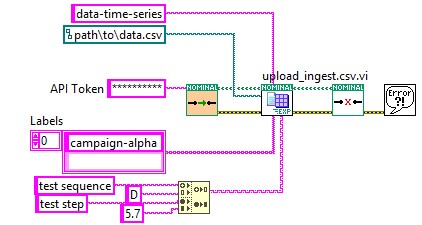
Each example uploads sample.csv, a minute of test data whose timestamp column holds ISO 8601 times, to an existing dataset:
from nominal.core import NominalClient

client = NominalClient.from_profile("default")
dataset = client.get_dataset("<ri.catalog.instance.dataset.identifier>")  # or client.create_dataset("My dataset")

file = dataset.add_tabular_data("sample.csv", timestamp_column="timestamp", timestamp_type="iso_8601")  # also Parquet
file.poll_until_ingestion_completed()  # raises NominalIngestError if the ingest fails
client = nominal.Client.fromProfile();
dataset = client.datasetByRid("<ri.catalog.instance.dataset.identifier>");

job = client.ingest("sample.csv", TimestampColumn="timestamp", Dataset=dataset);  % or NewDataset="My dataset"
job.wait();  % raises if the ingest fails
use nominal::core::{CsvIngest, Timestamp};

let client = nominal::NominalClient::from_profile("default")?;
client.ingest()
    .upload_csv("sample.csv", "<ri.catalog.instance.dataset.identifier>", CsvIngest::new(Timestamp::iso8601("timestamp")))
    .await?;
import (
	"bytes"
	"os"

	ingestapi "github.com/nominal-io/nominal-api-go/ingest/api"
	uploadapi "github.com/nominal-io/nominal-api-go/upload/api"
	"github.com/palantir/conjure-go-runtime/v2/conjure-go-client/httpclient"
	"github.com/palantir/pkg/rid"
	"github.com/palantir/pkg/safelong"
)

// httpClient is a conjure-go-runtime httpclient.Client for your Nominal REST API URL,
// and token is your API key as a bearertoken.Token
data, _ := os.ReadFile("sample.csv")
size := safelong.SafeLong(len(data))
path, _ := uploadapi.NewUploadServiceClient(httpClient).UploadFile(ctx, token, "sample.csv", &size, nil,
	httpclient.RequestBodyInMemory(bytes.NewReader(data)))
datasetRid, _ := rid.ParseRID("<ri.catalog.instance.dataset.identifier>")
ingestapi.NewIngestServiceClient(httpClient).Ingest(ctx, token, ingestapi.IngestRequest{
	Options: ingestapi.NewIngestOptionsFromCsv(ingestapi.CsvOpts{
		Source: ingestapi.NewIngestSourceFromS3(ingestapi.S3IngestSource{Path: string(path)}),
		Target: ingestapi.NewDatasetIngestTargetFromExisting(ingestapi.ExistingDatasetIngestDestination{DatasetRid: datasetRid}),
		TimestampMetadata: ingestapi.TimestampMetadata{
			SeriesName:    "timestamp",
			TimestampType: ingestapi.NewTimestampTypeFromAbsolute(ingestapi.NewAbsoluteTimestampFromIso8601(ingestapi.Iso8601Timestamp{})),
		},
	}),
})
nomctl ingest csv sample.csv --timestamp-column timestamp --timestamp-type iso8601 \
  --dataset <ri.catalog.instance.dataset.identifier>  # or --name "My dataset"
In the Nominal app#
Open the dataset’s page and click UPLOAD DATA. To find the dataset, in the sidebar click Data, then Data sources.
Drop the file onto Upload files, or click SELECT FILES and pick it.
In the Settings panel, check the Timestamp column and Timestamp format. For
sample.csv, they’retimestampand Absolute (ISO 8601).Click CONFIRM & INGEST.