

Uploading a non-native file using an extractor#
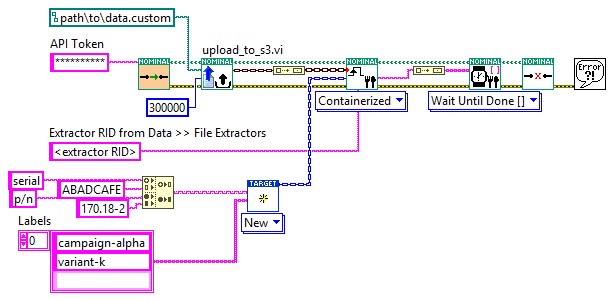
Upload a file in a format Nominal doesn’t read natively, and have a file extractor convert it to time-series data during ingest. The extractor must already be registered. Key each input file by the environment variable the extractor was registered with.
In code#
from nominal.core import NominalClient

client = NominalClient.from_profile("default")
dataset = client.get_dataset("<ri.catalog.instance.dataset.identifier>")

job = dataset.add_containerized("<extractor RID>", sources={"<input environment variable>": "data.bin"})
files = list(job.as_files_ingested())  # waits for the extractor, then for each file it produced
import (
	"bytes"
	"os"

	ingestapi "github.com/nominal-io/nominal-api-go/ingest/api"
	uploadapi "github.com/nominal-io/nominal-api-go/upload/api"
	"github.com/palantir/conjure-go-runtime/v2/conjure-go-client/httpclient"
	"github.com/palantir/pkg/rid"
	"github.com/palantir/pkg/safelong"
)

// httpClient is a conjure-go-runtime httpclient.Client for your Nominal REST API URL,
// and token is your API key as a bearertoken.Token
data, _ := os.ReadFile("data.bin")
size := safelong.SafeLong(len(data))
path, _ := uploadapi.NewUploadServiceClient(httpClient).UploadFile(ctx, token, "data.bin", &size, nil,
	httpclient.RequestBodyInMemory(bytes.NewReader(data)))
datasetRid, _ := rid.ParseRID("<ri.catalog.instance.dataset.identifier>")
extractorRid, _ := rid.ParseRID("<extractor RID>")
ingestapi.NewIngestServiceClient(httpClient).Ingest(ctx, token, ingestapi.IngestRequest{
	Options: ingestapi.NewIngestOptionsFromContainerized(ingestapi.ContainerizedOpts{
		ExtractorRid: ingestapi.ContainerizedExtractorRid(extractorRid),
		Sources: map[ingestapi.EnvironmentVariable]ingestapi.IngestSource{
			"<input environment variable>": ingestapi.NewIngestSourceFromS3(ingestapi.S3IngestSource{Path: string(path)}),
		},
		Target: ingestapi.NewDatasetIngestTargetFromExisting(ingestapi.ExistingDatasetIngestDestination{DatasetRid: datasetRid}),
	}),
})
In the Nominal app#
Open the dataset’s page and click UPLOAD DATA. To find the dataset, in the sidebar click Data, then Data sources.
On the File extraction card, click SELECT and choose the extractor.
In the extractor’s pane, click Select file for each of its inputs and pick the file.
Click CONFIRM & INGEST.
If you drop a file Nominal doesn’t read natively onto Upload files, the file’s pane asks you to Choose an extractor….