

Automated pass/fail checks#
Story: “I don’t want to read plots after every test. I want each test checked against its limits automatically, with a clear pass or fail.”
This page is for engineers who want their test data checked against its limits by Nominal rather than by eye, so attention goes only to the data that needs it.
A check evaluates channels against a condition, such as a temperature channel above its limit, and creates an event wherever the condition holds. A checklist is just a list of checks that can be performed together. Checks can be performed live or as a post-test analysis step.
Automated checks prerequisites#
Checking a test after it ends requires generation of a run for that test, and checking data live needs the unit’s asset. These may be generated using either the default or tagged data model approaches. If you don’t have these configured yet, start from Organize and view your data.
A check finds each channel by its ref name and channel name, optionally filtered by tag, so a checklist can be executed on every asset or run that uses the same ref names, channel names.
Automated checks can be performed after a test, once data has been associated with a run, or while the test is running using data streamed to an asset.
        ---
config:
  layout: elk

---
flowchart BT
    classDef green fill:#dcfce7,stroke:#15803d,color:#1f2937
    classDef red fill:#fee2e2,stroke:#b91c1c,color:#1f2937
    classDef blue fill:#e0f2fe,stroke:#0369a1,color:#1f2937

    asset1["Asset: UUT1"]:::green
    asset2["Asset: UUT2"]:::green

    run1["Run: Test A<br>on UUT1"]:::red
    asset1 --> run1
    run2["Run: Test A<br>on UUT2"]:::red
    asset2 --> run2

    checklist["Checklist: Test A limits<br><br>Looks for:<br>`default`.(channel)"]:::blue
    run1 -->|"after the test"| checklist
    run2 -->|"after the test"| checklist
    asset1 -.->|"live streaming"| checklist
    asset2 -.->|"live streaming"| checklist

    click asset1,asset2 href "../../../#asset" "Asset"
    click run1,run2 href "../../../#runs" "Runs"
    click checklist href "../../../../workbooks/#checklists" "Checklists"
If a run is missing a channel that a check uses, Nominal warns you before executing. The rest of the checklist is still executed, and the affected checks end with Execution error and create no events.
Note
To point a checklist at different ref names, open the checklist, click EDIT CHECKLIST to start a draft, and choose Edit ref names from the More (…) menu in its toolbar. Publishing the draft saves the change as a new version of the same checklist, not a copy.
Walkthrough#
Build a checklist#
In the sidebar, click Checklists, then NEW CHECKLIST. Nominal creates an untitled checklist and opens it.
Choose a run or an asset to preview the checks against.
Next to CHECKS, click +. Enter a Check name and a Priority, then click ADD CHECK.
Complete the sentence that defines the check: Create events of level Violation when the condition is met, then, under WHEN, choose a channel, a comparison such as
>, and the limit. Use Add condition or Add condition group to combine conditions with And or Or.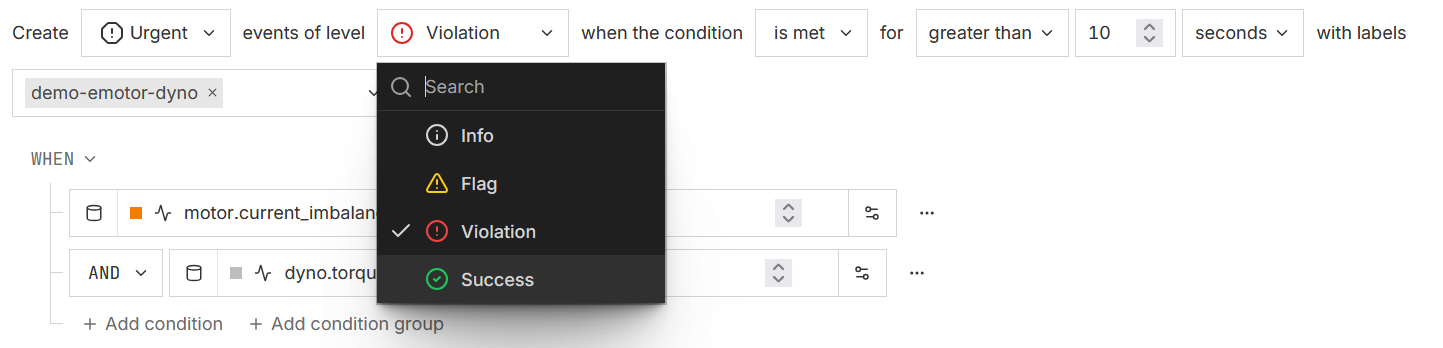
To apply the same check to several channels, click Apply check to other channels.
Click PUBLISH, enter a Message, and click PUBLISH. Only published checklists can be executed.
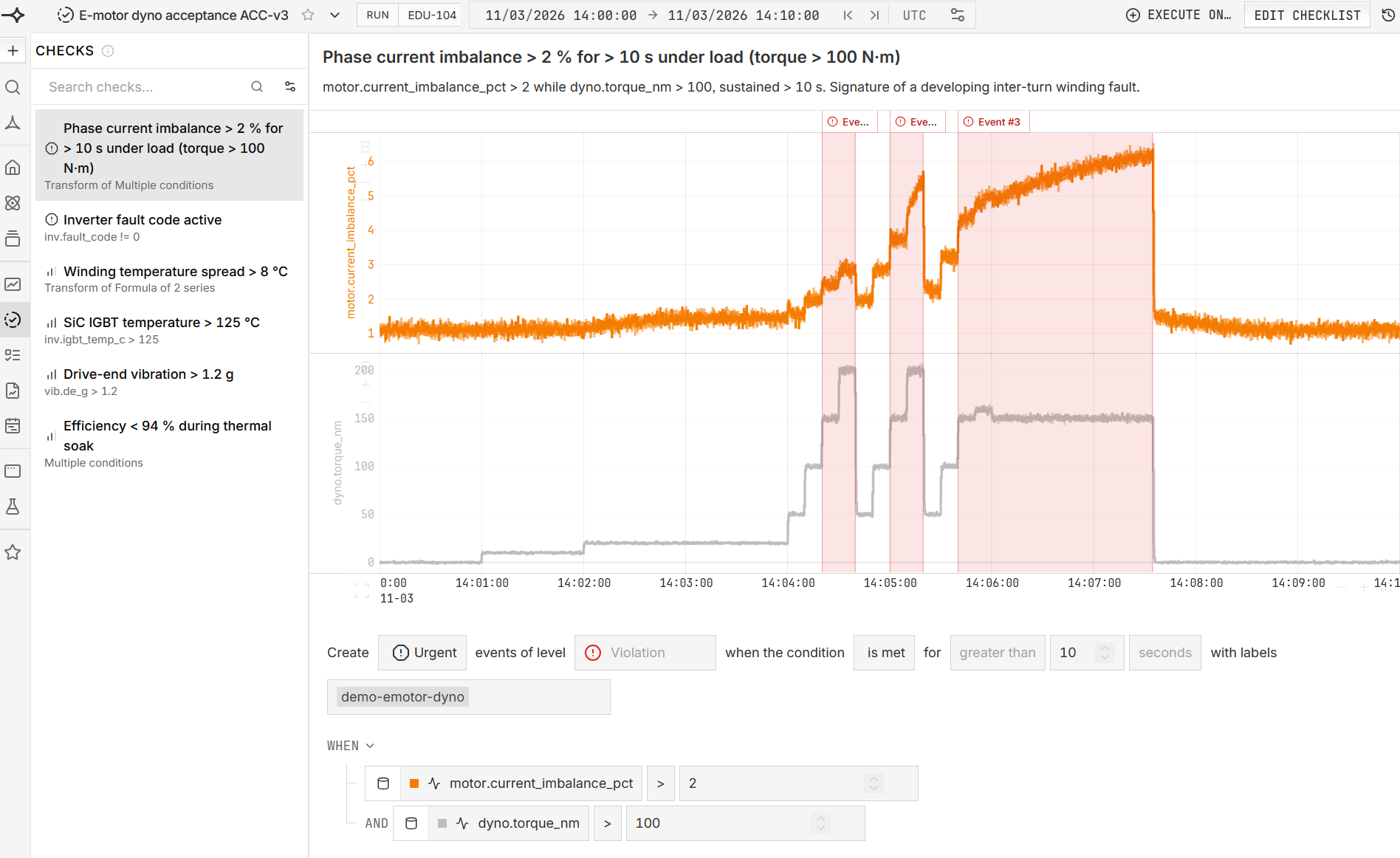
Use the Violation level for checks that mean failure. Checks at the Info, Flag, and Success levels still create events but don’t indicate a known failure.
To ignore brief spikes, set how long the condition must stay true using the for clause in the check, such as for greater than 10 seconds.
Check a test after it ends#
Open the run, go to its Checklist executions tab, and click EXECUTE CHECKLIST.
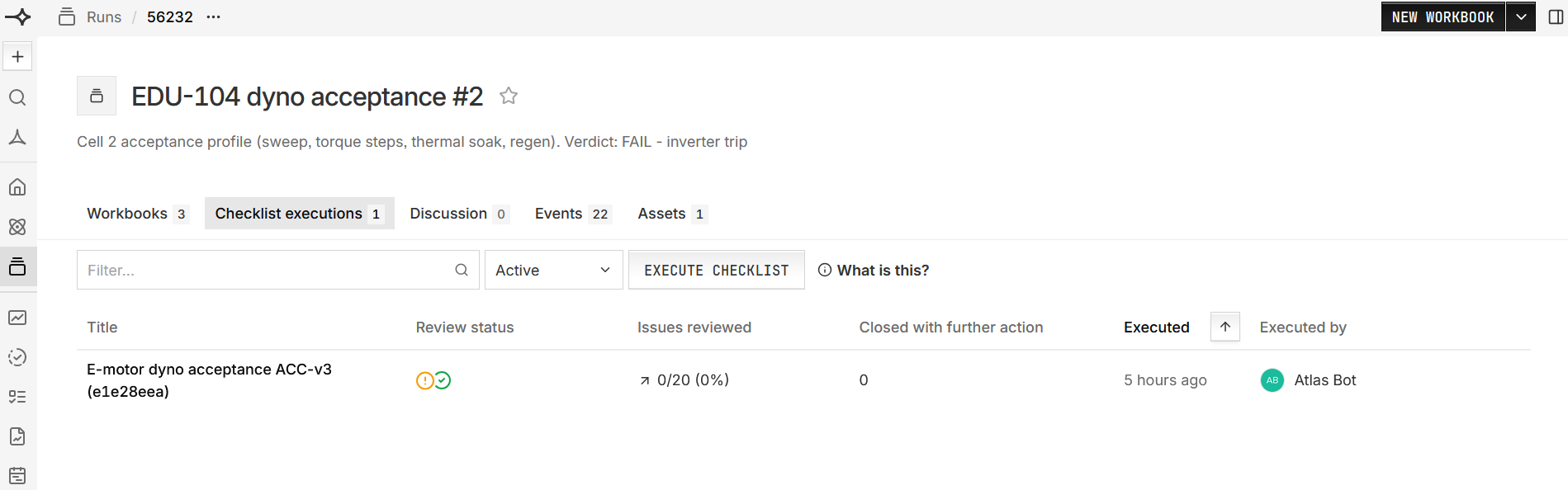
Select the checklist and click EXECUTE.
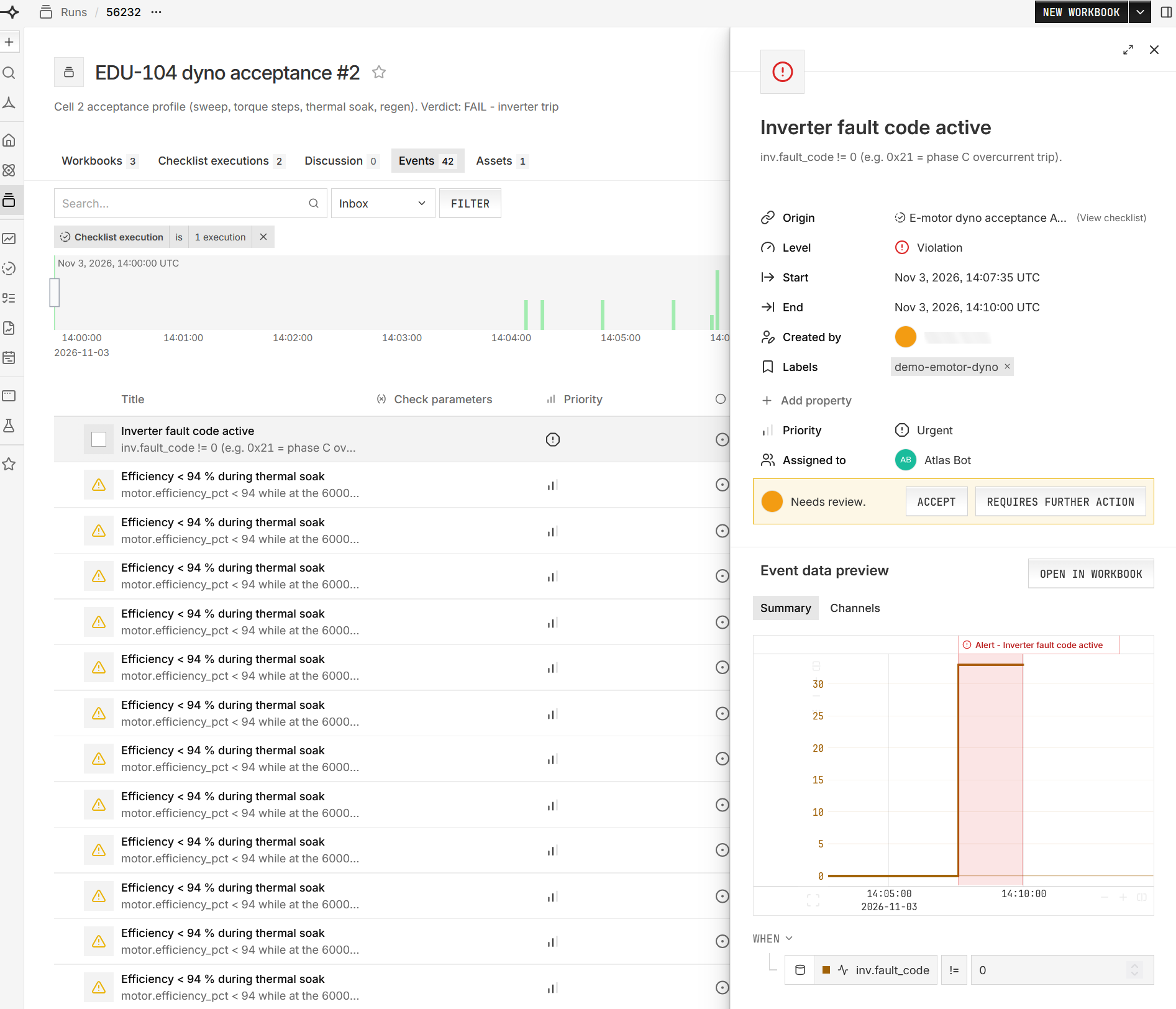
Click the execution to see each check’s status, such as Passed, Needs review, or Execution error.
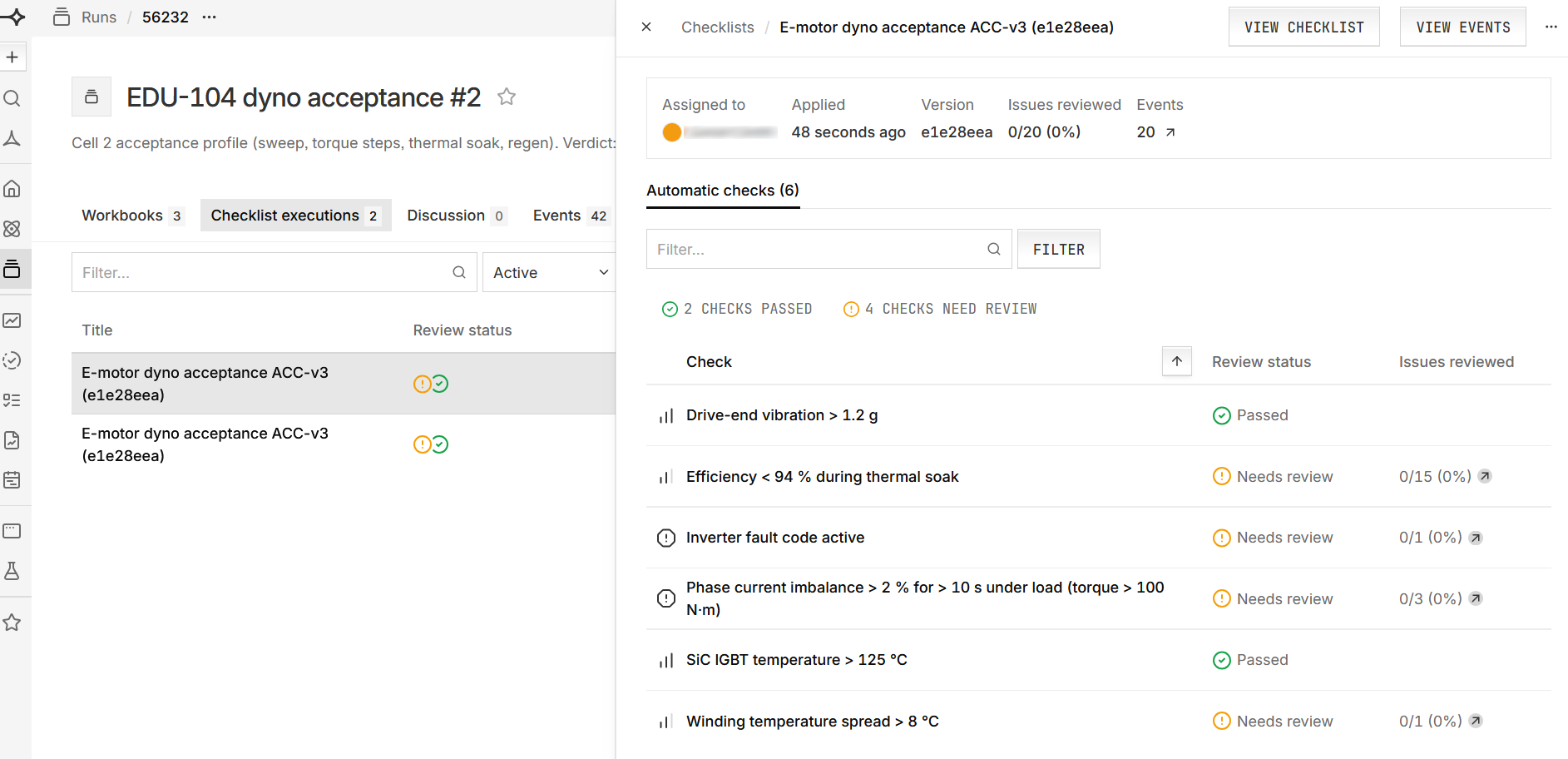
Click VIEW EVENTS to see the execution’s events on the run’s Events tab. Click an event and review it with ACCEPT or REQUIRES FURTHER ACTION. OPEN IN WORKBOOK shows the data around it.
Check many runs at once#
Open the published checklist, click EXECUTE ON…, and choose Run.
Select every run to check and click EXECUTE CHECKLIST ON RUN. Only runs with an end time are listed.
To compare results, the Checklist events column on the Runs page shows each run’s checklist events. On the Assets page, a 🔒︎metric column can show, for example, the violations in each asset’s latest run.
Check data live#
Execute the checklist on the asset before the test starts. A live checklist checks only the data streamed to the asset after it starts executing, not data already recorded.
Open the published checklist, click EXECUTE ON…, and choose Asset. If the asset has no checklists yet, you can also start from its Checklists tab with ADD CHECKLIST.
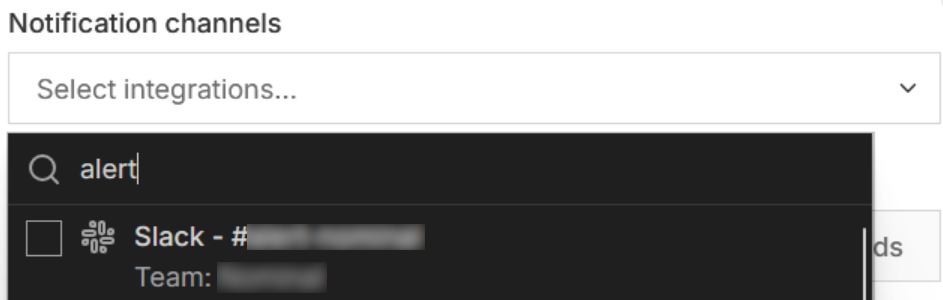
Under Assets, click CHANGE ASSETS and pick the assets. Optionally, under Notification channels, choose where to send alerts, such as Slack, Microsoft Teams, or PagerDuty.
To record failures as events while data streams in, select Create events.
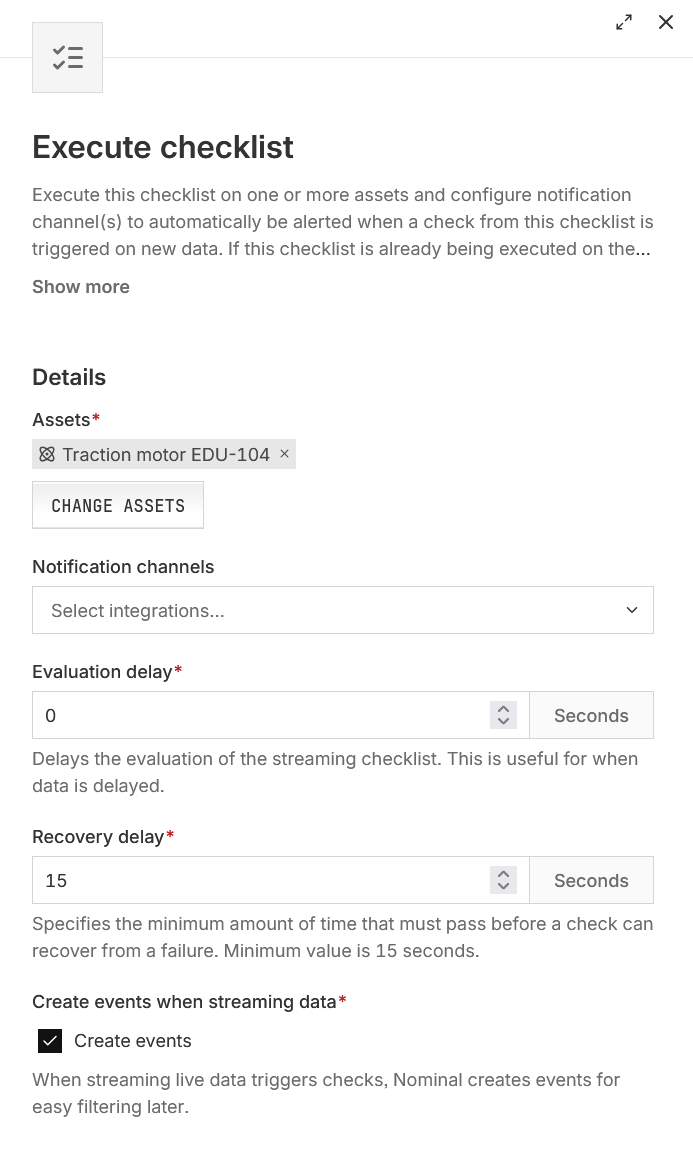
Click EXECUTE CHECKLIST.
Each asset’s Checklists tab shows whether each check is passing or failing. The checklist keeps executing until you remove it from the asset. Archiving the checklist doesn’t stop it.
Automating checklists#
Automating checklist execution#
Execute a published checklist on a run, wait for the execution to finish, and count the Violation events it created. In code, Violation events have the type ERROR.
from nominal.core import EventType, NominalClient

client = NominalClient.from_profile("default")
checklist = client.get_checklist("<ri.scout.instance.check-collection.identifier>")  # a published checklist

review = checklist.execute("<ri.scout.instance.run.identifier>").poll_for_completion()
violations = [e for e in review.get_events() if e.type == EventType.ERROR]
print(f"{len(violations)} violations", review.nominal_url)
use std::{collections::BTreeSet, sync::Arc, time::Duration};
use nominal::streaming::api::clients::event::{AsyncEventService, AsyncEventServiceClient};
use nominal::streaming::api::clients::scout::datareview::api::{AsyncDataReviewService, AsyncDataReviewServiceClient};
use nominal::streaming::api::objects::scout::datareview::api::{AutomaticCheckEvaluationState as State, BatchInitiateDataReviewRequest, CreateDataReviewRequest};
use nominal::streaming::api::objects::{event::EventType, scout::{rids::api::ChecklistRid, run::api::RunRid}};
use nominal::streaming::client::{async_conjure_client, conjure::http::client::{AsyncService, ConjureRuntime}};
use nominal::streaming::prelude::{BearerToken, ResourceIdentifier};

let config = nominal::Config::load()?;
let profile = config.get_profile("default").ok_or("no profile named default")?;
let token = BearerToken::new(profile.token())?;
let api = async_conjure_client("data-review", profile.base_url().parse()?).map_err(nominal::Error::from)?;
let runtime = Arc::new(ConjureRuntime::default());
let reviews = AsyncDataReviewServiceClient::new(api.clone(), &runtime);

// Execute the latest version of the checklist on the run
let request = BatchInitiateDataReviewRequest::builder()
    .push_requests(CreateDataReviewRequest::new(
        RunRid(ResourceIdentifier::new("<ri.scout.instance.run.identifier>")?),
        ChecklistRid(ResourceIdentifier::new("<ri.scout.instance.check-collection.identifier>")?),
    ))
    .build();
let review_rid = reviews.batch_initiate(&token, &request).await.map_err(nominal::Error::from)?.rids()[0].clone();

// Finished when no check is still pending or executing
let review = loop {
    let review = reviews.get(&token, &review_rid).await.map_err(nominal::Error::from)?;
    if !review.check_evaluations().iter().any(|c| matches!(c.state(), State::PendingExecution(_) | State::Executing(_))) {
        break review;
    }
    tokio::time::sleep(Duration::from_secs(2)).await;
};

// Each check that created events lists them
let event_rids: BTreeSet<_> = review.check_evaluations().iter()
    .filter_map(|c| match c.state() { State::GeneratedAlerts(s) => Some(s.event_rids().clone()), _ => None })
    .flatten()
    .collect();
let events = AsyncEventServiceClient::new(api, &runtime)
    .batch_get_events(&token, &event_rids).await.map_err(nominal::Error::from)?;
let violations = events.iter().filter(|e| *e.type_() == EventType::Error).count();
println!("{violations} violations");
A check that couldn’t be executed, such as one whose channel is missing, creates no events, so the code above can’t tell it apart from a check that passed. Confirm in the app that no check ended with Execution error.
Automating checklist creation#
Each example creates a checklist with one check. The check finds the ranges where the temperature channel under the default ref name is above 80, and creates a Violation event when there are more than 0 of them. A checklist created this way is published straight away.
ChecklistBuilder is experimental, so its API may change between releases. It needs the client’s compute extra, installed with pip install "nominal[compute]". To keep checklists in your repository and update them, see Authoring checklists as code.
from nominal.core import NominalClient, Priority
from nominal.experimental.compute_as_code import ChannelBinding, CheckDefinition, ChecklistBuilder

client = NominalClient.from_profile("default")

builder = ChecklistBuilder()
builder.add(
    CheckDefinition("Temperature above 80", "(temperature > 80).ranges()", priority=Priority.P2),
    inputs={"temperature": ChannelBinding("default", "temperature")},  # `temperature` under ref name `default`
)
checklist = builder.create(client, "Temperature limits")
print(checklist.nominal_url)
This example builds the REST API request directly.
use std::{collections::BTreeMap, sync::Arc};
use nominal::streaming::api::clients::scout::checks::api::{AsyncChecklistService, AsyncChecklistServiceClient};
use nominal::streaming::api::objects::{api::Channel, scout::rids::api::UserRid};
use nominal::streaming::api::objects::scout::api::{ChannelLocator, DataSourceRefName, Priority};
use nominal::streaming::api::objects::scout::checks::api::{CreateCheckRequest, CreateChecklistEntryRequest, CreateChecklistRequest, UnresolvedCheckCondition, UnresolvedNumRangesConditionV3, UnresolvedVariableLocator};
use nominal::streaming::api::objects::scout::compute::api::{DoubleConstant, NumericSeries, RangeSeries, Reference, ThresholdOperator, ThresholdingRanges, VariableName};
use nominal::streaming::client::{async_conjure_client, conjure::http::client::{AsyncService, ConjureRuntime}};
use nominal::streaming::prelude::{BearerToken, ResourceIdentifier};

let config = nominal::Config::load()?;
let profile = config.get_profile("default").ok_or("no profile named default")?;
let me = nominal::NominalClient::from_profile("default")?.users().who_am_i().await?;

// Ranges where temperature > 80; "temperature" is bound to that channel under ref name "default"
let condition = UnresolvedNumRangesConditionV3::builder()
    .ranges(RangeSeries::Threshold(ThresholdingRanges::new(
        NumericSeries::Raw(Reference::new(VariableName("temperature".into()))),
        DoubleConstant::Literal(80.0),
        ThresholdOperator::GreaterThan,
    )))
    .function_spec(BTreeMap::<String, String>::new())
    .threshold(0) // violation if more than 0 ranges
    .operator(ThresholdOperator::GreaterThan)
    .insert_variables(
        VariableName("temperature".into()),
        UnresolvedVariableLocator::Series(ChannelLocator::new(DataSourceRefName("default".into()), Channel("temperature".into()))),
    )
    .build();
let check = CreateCheckRequest::builder()
    .title("Temperature above 80")
    .description("")
    .priority(Priority::P2)
    .condition(UnresolvedCheckCondition::NumRangesV3(condition))
    .build();
let request = CreateChecklistRequest::builder()
    .commit_message("Create checklist")
    .assignee_rid(UserRid(ResourceIdentifier::new(me.rid())?))
    .title("Temperature limits")
    .description("")
    .push_checks(CreateChecklistEntryRequest::CreateCheck(check))
    .build();
let api = async_conjure_client("checklists", profile.base_url().parse()?).map_err(nominal::Error::from)?;
let checklist = AsyncChecklistServiceClient::new(api, &Arc::new(ConjureRuntime::default()))
    .create(&BearerToken::new(profile.token())?, &request).await.map_err(nominal::Error::from)?;
This example builds the REST API request directly.
import (
	authapi "github.com/nominal-io/nominal-api-go/authentication/api"
	scoutapi "github.com/nominal-io/nominal-api-go/scout/api"
	checksapi "github.com/nominal-io/nominal-api-go/scout/checks/api"
	computeapi "github.com/nominal-io/nominal-api-go/scout/compute/api"
	computeapi1 "github.com/nominal-io/nominal-api-go/scout/compute/api1"
	scoutrids "github.com/nominal-io/nominal-api-go/scout/rids/api"
)

// httpClient is a conjure-go-runtime httpclient.Client for your Nominal REST API URL,
// and token is your API key as a bearertoken.Token
me, _ := authapi.NewAuthenticationServiceV2Client(httpClient).GetMyProfile(ctx, token)
greaterThan := computeapi.New_ThresholdOperator(computeapi.ThresholdOperator_GREATER_THAN)
condition := checksapi.NewUnresolvedCheckConditionFromNumRangesV3(checksapi.UnresolvedNumRangesConditionV3{
	// Ranges where temperature > 80
	Ranges: computeapi1.NewRangeSeriesFromThreshold(computeapi1.ThresholdingRanges{
		Input:     computeapi1.NewNumericSeriesFromRaw(computeapi.Reference{Name: "temperature"}),
		Threshold: computeapi.NewDoubleConstantFromLiteral(80),
		Operator:  greaterThan,
	}),
	Variables: map[computeapi.VariableName]checksapi.UnresolvedVariableLocator{
		"temperature": checksapi.NewUnresolvedVariableLocatorFromSeries(scoutapi.ChannelLocator{
			DataSourceRef: "default", Channel: "temperature",
		}),
	},
	Threshold:    0, // violation if more than 0 ranges
	Operator:     greaterThan,
	FunctionSpec: map[string]any{},
})
checklist, _ := checksapi.NewChecklistServiceClient(httpClient).Create(ctx, token, checksapi.CreateChecklistRequest{
	Title:         "Temperature limits",
	CommitMessage: "Create checklist",
	AssigneeRid:   scoutrids.UserRid(me.Rid),
	Checks: []checksapi.CreateChecklistEntryRequest{
		checksapi.NewCreateChecklistEntryRequestFromCreateCheck(checksapi.CreateCheckRequest{
			Title:     "Temperature above 80",
			Priority:  scoutapi.New_Priority(scoutapi.Priority_P2),
			Condition: &condition,
		}),
	},
})
Next steps#
Repeatable test execution: runs for every test, so every test can be checked.
Live monitoring on console: watching the data while live checks execute.
🔒︎Checks and checklists in the platform docs.